
Update 17-Oct-2026: the client’s SCP now lets our ParallelCluster operator role delete CloudWatch alarms and dashboards, so our clusters run with monitoring on again. See the update section.
TL;DR
It is counterintuitive, but it is safer to let AWS ParallelCluster deploy itself with broad permissions than to hand it pre-made roles. When ParallelCluster creates its own IAM roles at create-cluster time it knows the stack ID, the cluster name, the hosted zone, the subnets and the AMIs, so the policies it writes name those exact resources. A role written before the cluster exists cannot know any of that, so it falls back to Resource: "*" and parallelcluster-* wildcards: any CloudFormation stack, any Route 53 hosted zone in the account.
The catch is that self-deploy, as AWS documents it, “enables the user to have IAM Administrator privileges in the AWS account”. In most real deployments the person running pcluster create-cluster is simply signed in with an administrator role. That was not acceptable in a client’s shared production account, so we kept the self-deploy model and fenced it:
- every role ParallelCluster creates must sit under one IAM path (
/lab/) and have a permissions boundary we control attached, or IAM refuses to create it; - the operator roles that run
pcluster, Terraform and Packer can only create, tag and change resources they own (tag-on-create, never tag-to-adopt), in one region, in six subnets; - everything that belongs to other teams, the shared network, the security tooling and the guardrails themselves is behind explicit denies.
Sanitised copies of four of the policies are available to download.
Who is this post for?
ParallelCluster admins and cloud/HPC engineers who have to deploy clusters into an AWS account they share with other teams, and who have been told “no” when they asked for admin. If you run ParallelCluster in a dedicated sandbox account, the default (admin plus privileged IAM mode) is fine and you can stop reading here.
The rest of the post assumes you know IAM policy evaluation, permissions boundaries and the ParallelCluster config file. If ParallelCluster itself is new to you, start with What is AWS ParallelCluster.
What we learned
- Pre-made roles are not the safer option. Restricted IAM access mode (an admin creates the roles up front) sounds conservative, but the documented head-node policy for it is account-wide in several places. The figure below compares it, line by line, with what ParallelCluster writes itself.
- The permissions boundary is the real ceiling, not the operator’s policy. Anyone who can write a bounded role’s policy and then get that role’s credentials (assume it, or run a command on an instance that has it) gets everything the boundary allows. So the boundary needs the same “don’t touch other teams’ stuff” denies the operator roles have.
- Tag-based ownership only works if tagging cannot adopt. If a principal can
CreateTagson an existing, untagged resource, then “may manage anything taggedlab:managed=true” means “may manage anything”. Tags must only be set inside the call that creates the resource. - The IAM policy simulator evaluates the request context you hand it, not the one AWS sends. Our worst finding passed two review rounds and the simulator, and fell over on the first live
--dry-run. - Tag conditions break CloudFormation. CloudFormation reads each resource straight after creating it; tag-gated reads fail that check. For the services only ParallelCluster’s stacks need (Lambda, Image Builder, SNS, launch templates) we gate on
aws:CalledViainstead. - 6,144 characters is a design constraint. A managed policy, and therefore a permissions boundary, is capped at 6,144 characters (whitespace not counted). Ours sat at 6,101 for a while. When the image-build pipeline needed one more permission, the fix was a second, smaller boundary just for that pipeline.
- Organization guardrails you do not own will bite ParallelCluster. A service control policy that denied
cloudwatch:DeleteAlarmsto everyone wedged our stacks until the client exempted our pcluster role; one that requires aNametag onRunInstancesmakes two of ParallelCluster’s own validators fail every time.
Background: a shared production account
The client is a biopharma company moving computational chemistry work (Schrödinger Suite on Slurm) into AWS. The cluster lives in the company’s existing production account, next to workloads owned by other teams: a shared VPC, shared route tables and DNS, Systems Manager associations that domain-join and patch every instance in the account, and organization-level service control policies (SCPs) and tag policies that the HPC team does not control.
BioTeam was delegated the whole HPC stack. The design constraint we wrote at the top of the guardrails Terraform was zero effect on any other principal, system or resource in the account and VPC. In practice that meant:
- nothing account-wide: no SCP, no account setting, no change to any existing role or policy;
- everything we grant is either name/path-scoped to our resources or tag-scoped in a way that cannot be used to adopt someone else’s resource;
- humans deploy through named roles, never with the SSO administrator role.
Why self-deploy beats pre-made roles
ParallelCluster offers three ways to handle IAM (AWS ParallelCluster User Guide, “AWS Identity and Access Management permissions”):
- Privileged IAM access mode. ParallelCluster creates every role it needs; the docs say the policies “are scoped down to enable access to cluster resources only”, and warn that the mode “enables the user to have IAM Administrator privileges in the AWS account”.
- Restricted IAM access mode. An administrator creates the head-node, compute, Lambda and image-build roles in advance and passes them in the config.
PermissionsBoundarymode. ParallelCluster creates the roles, but each must have a permissions boundary you name attached.
The obvious reading is that restricted mode is the safe one. Look at what the documented head-node policy for a pre-made role grants, though, next to what ParallelCluster 3.16.0 generates when it creates the same role itself:
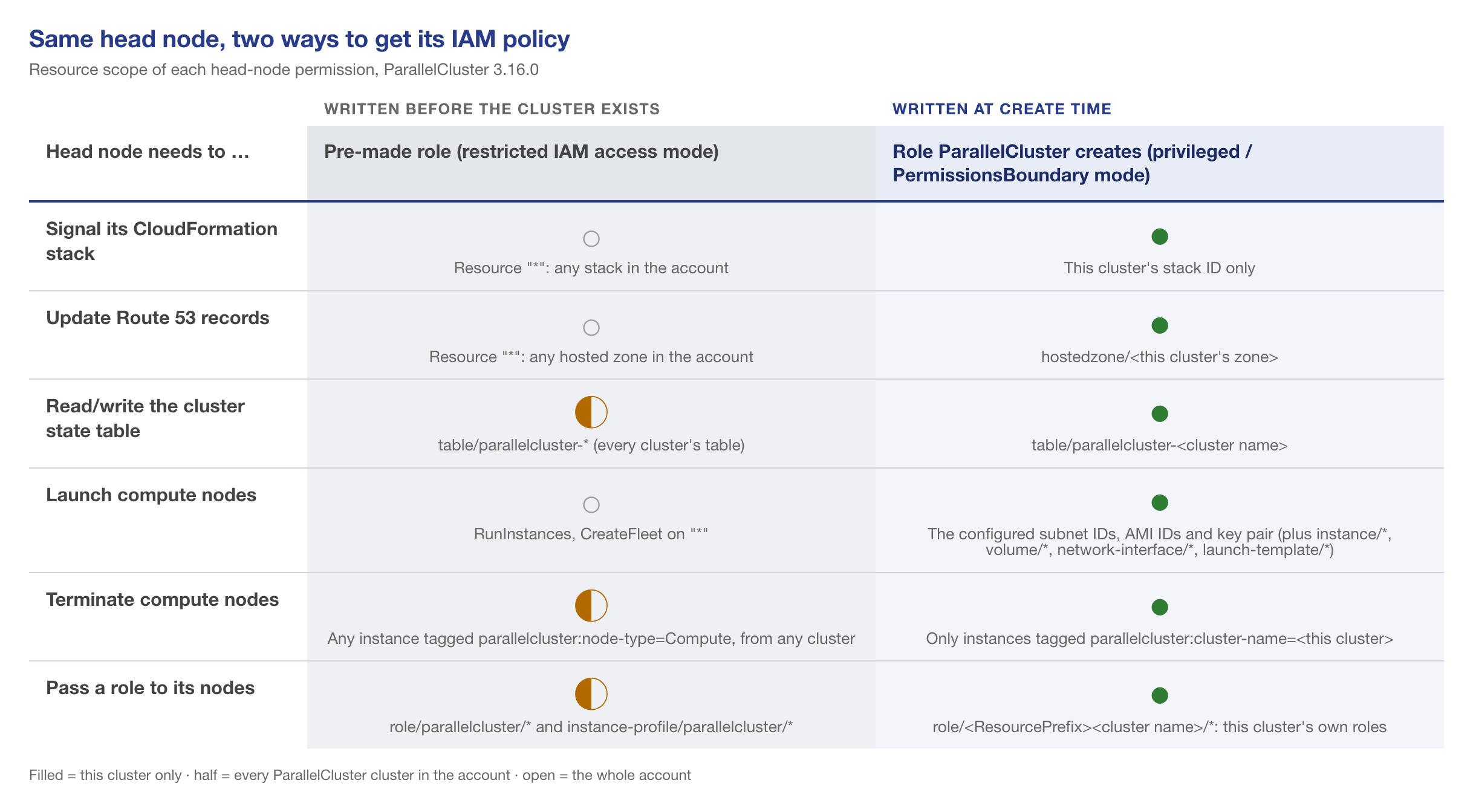
cdk_builder_utils.py and slurm_builder.py at tag v3.16.0.A pre-made head-node role can signal any CloudFormation stack, rewrite records in any Route 53 hosted zone, launch instances anywhere and terminate every compute node of every cluster in the account. That is not AWS being sloppy. When the role is written, the stack ID, the hosted zone ID and the cluster name do not exist yet, so the policy has no choice but to use wildcards. ParallelCluster writes its policies inside the CloudFormation stack, where all of those are known.
So we kept ParallelCluster in charge of its own IAM (PermissionsBoundary mode with a resource prefix) and spent our effort on the part AWS leaves to you: what the boundary says, and what the person running pcluster is allowed to do.
The design

Four pieces, all applied by an administrator from a separate Terraform root and stored under their own IAM path (/lab-guardrails/), which the operator roles may read and nothing else:
- Two operator roles.
LabDeployerRoleruns Terraform and Packer for everything that is not ParallelCluster (EC2 servers, EFS, RDS, buckets, secrets, the golden AMI).LabPclusterRolerunspcluster. Both share the same EC2, IAM and data policies and the same deny sets; the pcluster role adds one policy for the services only ParallelCluster needs. They are two roles because the deployer already had 8 of the default 10 managed-policy attachments, and because the deployer has no business holding CloudFormation or Lambda rights. - The workload boundary (
LabPermissionsBoundary), the ceiling for every role ParallelCluster creates for the head node, the compute queues and the stack’s Lambda functions. - The image-build boundary (
LabImageBuildBoundary), a much smaller ceiling for thepcluster build-imagepipeline roles. - Trust pinned to people. One trust statement per operator, pairing that person’s SSO user ID with a role session name equal to their login (
sts:RoleSessionName). Nobody can assume the role under someone else’s name, Session Manager session IDs start with the person’s name, and CloudTrail attribution is real.
1. IAM: roles only under one path, only with a boundary
The heart of it is one allow and two denies:
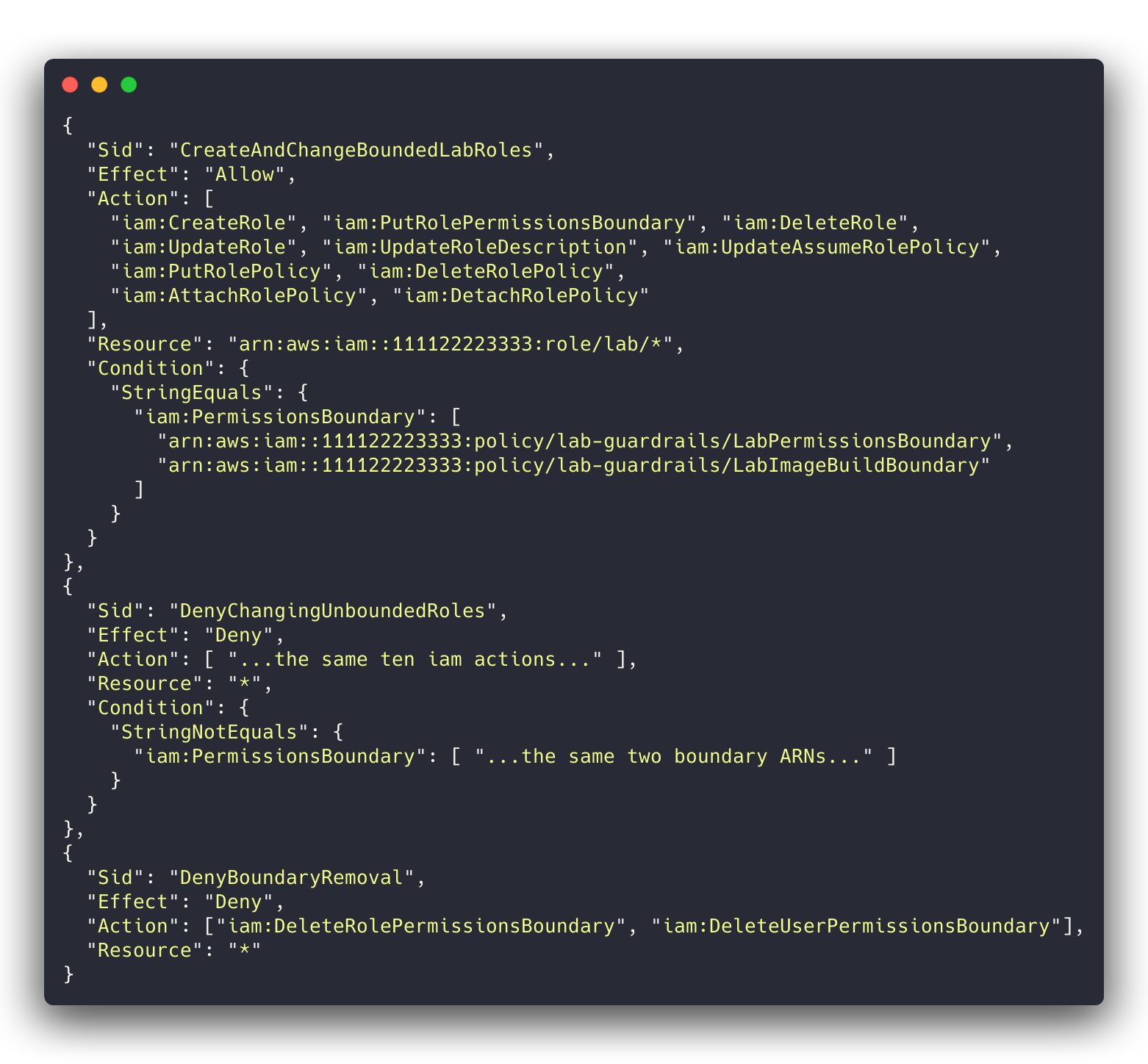
/lab/ and only when one of the two boundaries is attached; any change to a role without one is denied outright.iam:PermissionsBoundary is present on CreateRole and on every role-changing call, so StringEquals on it means “only with this boundary”. A few details that took us a review round each:
- Use
StringEquals, notStringEqualsIfExists, and list exact boundary ARNs.IfExistslets aCreateRolewithout any boundary through. A pattern such aspolicy/lab*lets the operator write its own policy under/lab/and use that as the “boundary”. TagRoleandUntagRoledo not support theiam:PermissionsBoundarycondition key (Service Authorization Reference for IAM). Gate them on it and every tag call is silently denied. Grant them on the/lab/path only; every role there is bounded anyway.- The deny on unbounded roles matters more than the allow. The client account already had one role under the HPC path, created before the guardrails, with no boundary. In round 1 the simulator happily let the deployer attach
AdministratorAccessto it and then start a Session Manager session on its instance: account admin in two calls.DenyChangingUnboundedRolescloses that, and the first guardrails apply put the boundary on that role. - Service-linked roles live under
role/aws-service-role/, outside your path. Grantiam:CreateServiceLinkedRolethere with a condition oniam:AWSServiceName(Image Builder, Spot, EFS, RDS, Backup in our case), and deny every other change to service-linked roles. - No
sts:AssumeRolefor the operators at all. Otherwise “write a/lab/role’s trust policy, then assume it” goes straight around the boundary. PassRoleonly for/lab/roles, and only to the services that need them viaiam:PassedToService(ec2,backup,imagebuilderfor the deployer;lambdafor the pcluster role).
2. The workload boundary
The boundary is an allow list behind a set of denies. The allows are what the head node, compute nodes and stack Lambdas actually call: an explicit list of EC2 actions (no ec2:*), the SSM and CloudWatch agents, our named buckets, log groups, secrets and parameters, KMS only through AWS services (kms:ViaService), CloudFormation signalling and the two cluster DynamoDB tables, and S3 reads from buckets in other accounts (the AWS-owned ParallelCluster and agent buckets) via s3:ResourceAccount.
The denies are the part that protects everyone else:
- One region.
aws:RequestedRegionwith aNotActionexemption for the global services (iam:*,sts:*): IAM requests go to the global endpoint and are evaluated with its region, not yours, so a plain region deny breaks every IAM call the roles make. - Six subnets.
RunInstances,CreateNetworkInterfaceandCreateFleetare denied on anysubnet/*whoseec2:SubnetIDis not one of ours. (Our first version keyed onec2:Subneton the network-interface resource.CreateNetworkInterfacedoes not include that key in its request, the negated operator fired on the missing key, and every ENI create was denied. That was round 2’s blocker.) - Our security groups only on new instances and ENIs.
- No copying from what we don’t own.
CreateSnapshotandCreateImagefrom a foreign instance or volume (with the defaultNoReboot=false,CreateImagereboots the other team’s instance),CreateVolumeandCopySnapshotfrom an account-owned untagged snapshot, and launches from account-owned AMIs that are neither ours nor tagged as approved golden images. AMIs owned by other accounts (AWS, Marketplace) stay usable. - Ownership. Every non-create EC2 action is denied on any resource not tagged
lab:managed=true. - Tagging. See the next section; this is the one that bit us.
At 6,101 of 6,144 characters there is no room for anything clever. We named every EC2 action explicitly (ec2:*Instances also matches reserved and scheduled-instance calls, ec2:*Snapshot also matches ImportSnapshot), kept wildcards only where the Service Authorization Reference for EC2 shows they match nothing extra, and rendered a slimmer copy of the shared deny set for the boundary that drops denies for actions the boundary never grants.
3. Tag on create, never tag to adopt
ParallelCluster tags what it creates, so lab:managed=true is the natural ownership marker. The rule that makes it safe: a principal may set tags only in the same call that creates the resource. EC2 tells you which call that is with the ec2:CreateAction condition key (Grant permission to tag Amazon EC2 resources during creation).
Here is our first version. It passed both review rounds and the policy simulator:
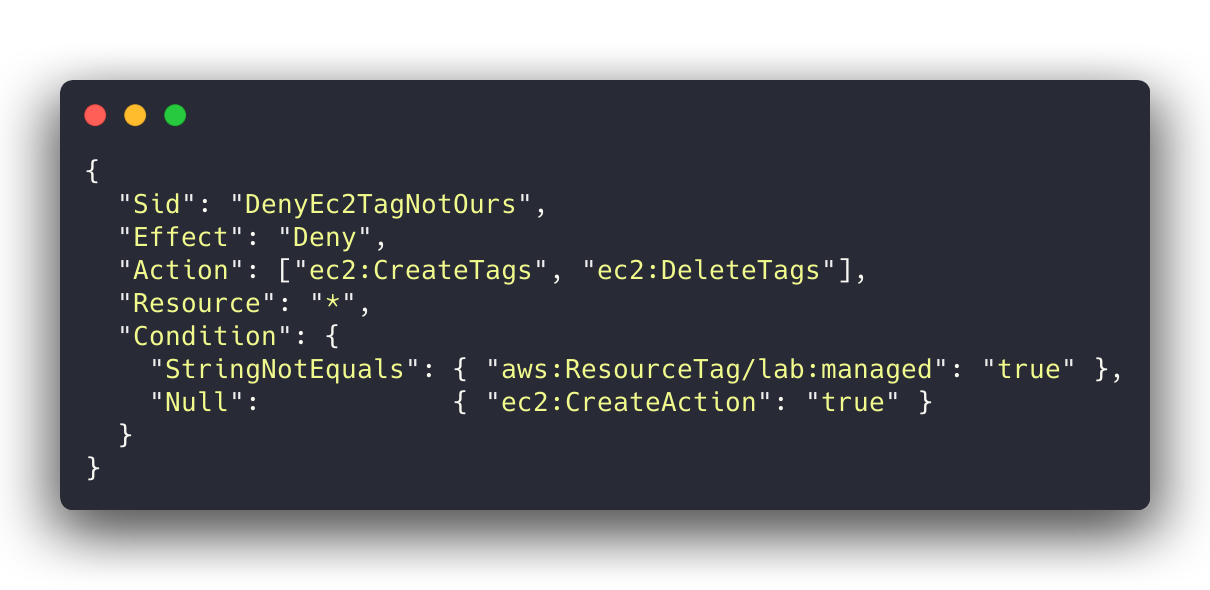
ec2:CreateAction is present” looks right.On the first live aws ec2 create-tags --dry-run against an instance that belonged to someone else, the answer was DryRunOperation (it would have worked) for any tag, including lab:managed=true. EC2 evidently fills in ec2:CreateAction on a plain CreateTags call as well, so the presence test never fires. That is what we observed; I have not found it documented anywhere. The simulator only evaluates the context keys you give it, and nothing told us to give it that one. With that one gap, the deployer and every bounded role could adopt any EC2 resource in the account and then manage or terminate it through the tag-scoped grants.
The fix is to name the create calls:
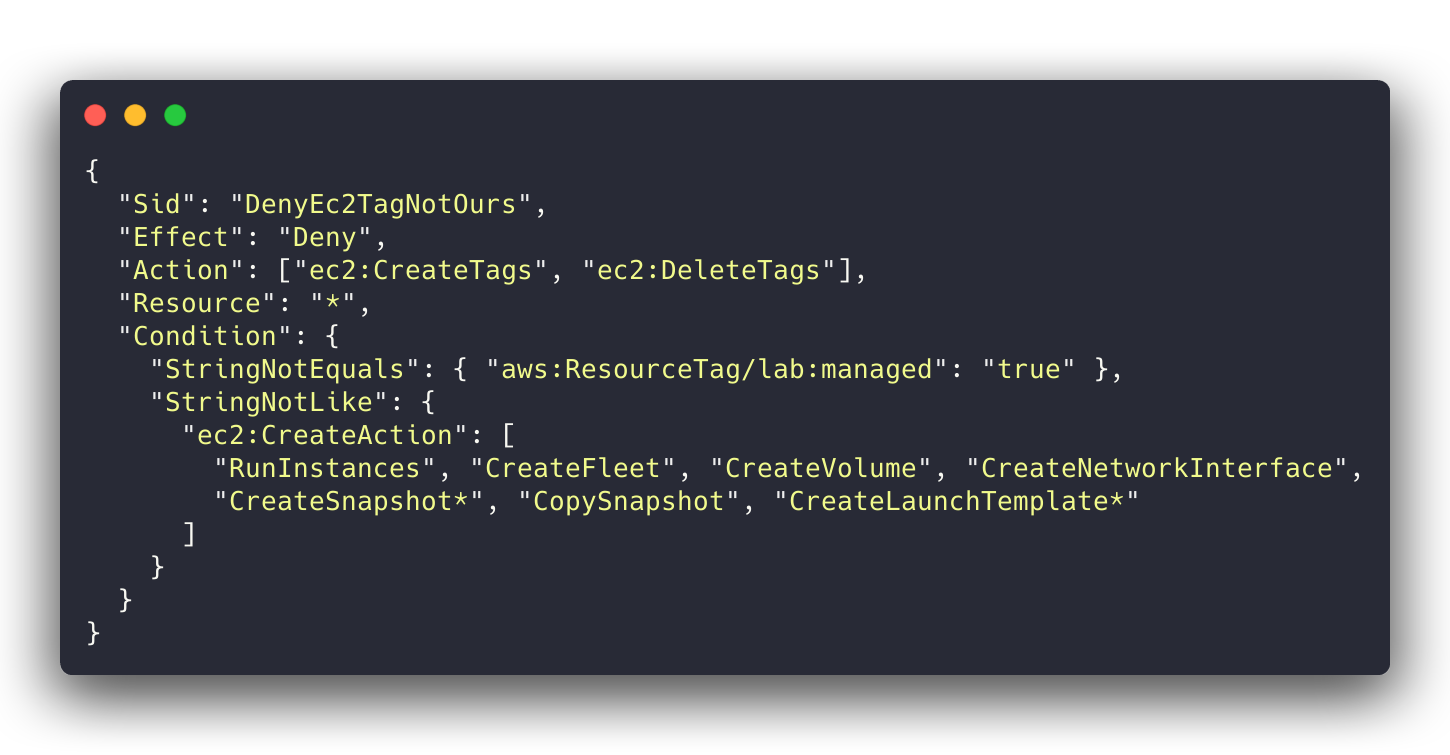
CreateTags and DeleteTags are never on the list.The list is per principal: the boundary’s list has only the creates the boundary grants, the operators’ adds security groups, key pairs, images and placement groups. DeleteTags is in the deny because removing the Name tag from a shared subnet is a perfectly good way to break somebody else’s automation (and our own subnet lookup).
The same thinking applies outside EC2. In round 1 the deployer could rds:AddTagsToResource on another team’s database and then delete it, and the same for EFS, Lambda, DynamoDB, CloudFormation and Backup. The fixes were name-prefix scoping for services where we choose the name, and tag-only-at-creation (elasticfilesystem:CreateAction) for EFS, whose IDs are random.
4. ParallelCluster-only services, through CloudFormation only
LabPclusterRole adds CloudFormation, Lambda, Image Builder, SNS, DynamoDB, launch templates and CloudWatch dashboards and alarms. CloudFormation is scoped by stack name. Our first draft scoped the others with lab:managed tag conditions, and the first pcluster build-image failed: CloudFormation’s resource handlers read each resource straight after creating it, and the tag-gated read was denied.
What worked is to allow those services only when the call comes through CloudFormation, on ParallelCluster’s name patterns:
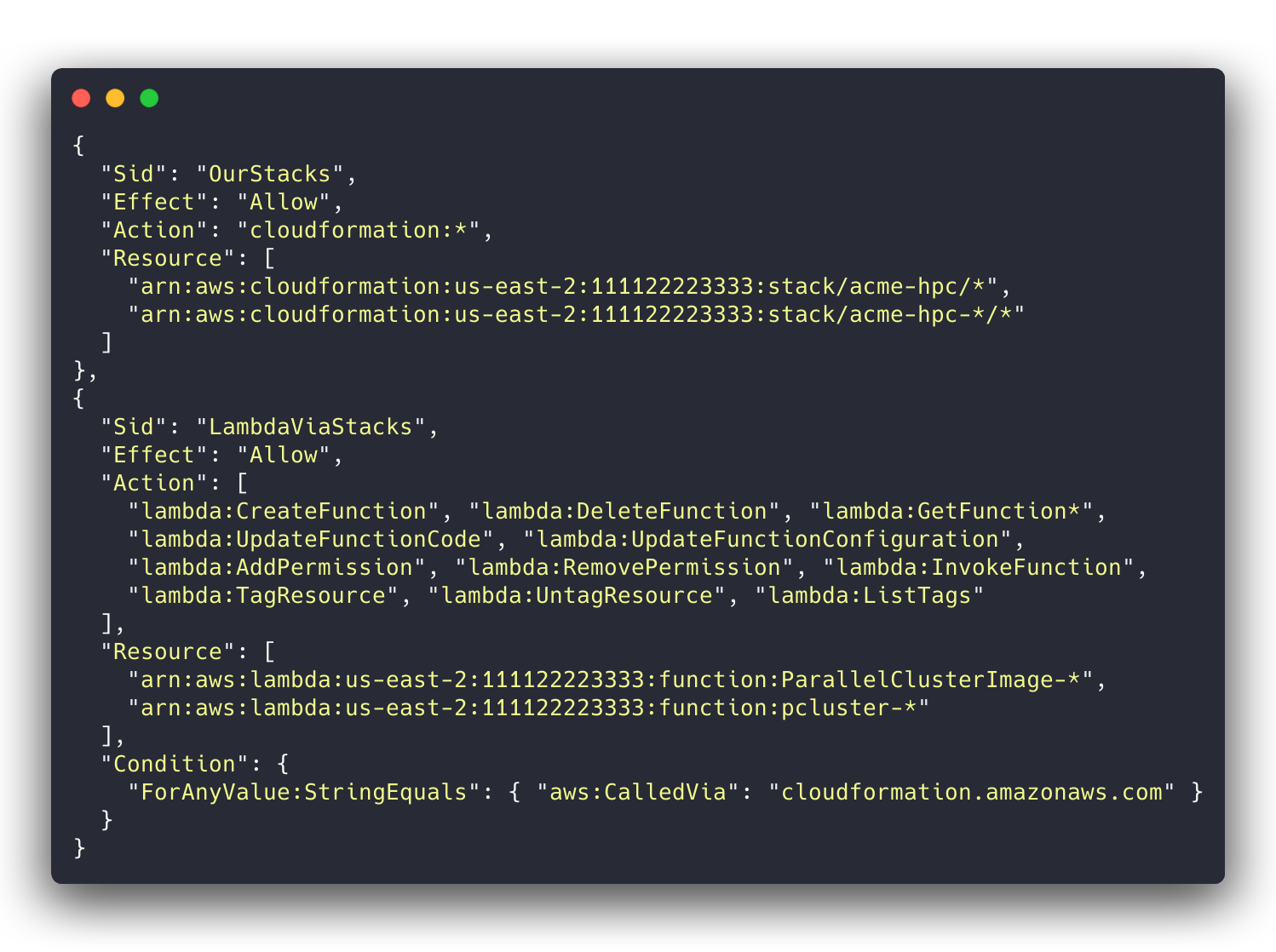
Use ForAnyValue:StringEquals with aws:CalledVia (it is a multivalued key, and AWS wants a set operator on those), and do not grant TagResource on these services outside the stack path, or another team’s Lambda becomes adoptable again.
Launch templates got the same treatment for a different reason: ParallelCluster’s stack creates the queue launch templates with no tags, so a tag-based ownership check cannot apply to them. They are allowed only via CloudFormation, and direct changes to untagged launch templates are denied.
5. The cluster config side
Some guardrails live in the ParallelCluster config rather than in IAM:
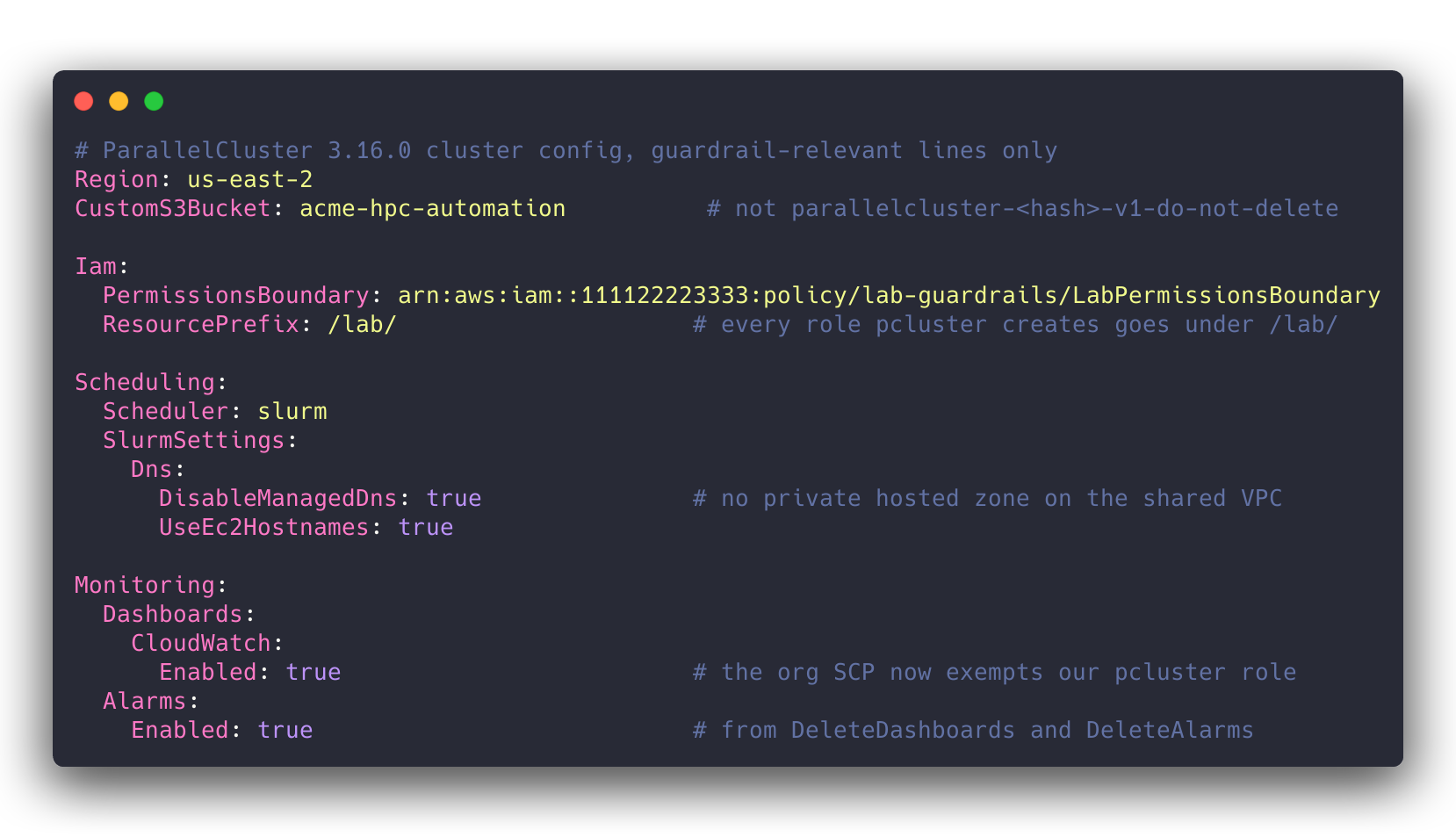
Iam.PermissionsBoundaryandIam.ResourcePrefix: /lab/put every role ParallelCluster creates on our path and under our ceiling.DisableManagedDnsplusUseEc2Hostnames, because otherwise ParallelCluster creates a Route 53 private hosted zone and associates it with the VPC, which here is the shared VPC.CustomS3Bucket, so ParallelCluster uses one of our named buckets instead of creatingparallelcluster-<hash>-v1-do-not-delete.- For
build-image, the one place we pre-create roles: the image config has noResourcePrefix, and the default instance profile and cleanup Lambda role are created under/parallelcluster/, which the operator cannot pass. So the Image Builder instance profile and the cleanup role are created on our path by Terraform, both capped by the image-build boundary (Build.Iam.PermissionsBoundary). - Alarms and dashboards were off at first. An organization SCP denied
cloudwatch:DeleteAlarmsandcloudwatch:DeleteDashboardsto every principal in the account, administrator included. ParallelCluster creates both by default, so a stack that owned them could neither roll back (ROLLBACK_FAILED) nor delete (DELETE_FAILED). The client has since exempted our pcluster role and both are back on; see the update below. - Two launch-template validators suppressed (
--suppress-validatorstype:HeadNodeLaunchTemplateValidator type:ComputeResourceLaunchTemplateValidator). Their dry-runRunInstancessends noNametag, and another SCP denies untagged launches, so they fail every time. Every other validator still runs.
Update, 17-Oct-2026: alarms and dashboards are back
We worked with the client’s cloud team on that SCP. It now allows cloudwatch:DeleteAlarms and cloudwatch:DeleteDashboards when the principal is our pcluster operator role, and still denies them to everyone else, administrators included. So we deploy clusters with ParallelCluster’s head-node alarms and cluster dashboard turned on, and pcluster delete-cluster removes them along with the rest of the stack instead of wedging it in DELETE_FAILED.
If you are about to ask your own cloud team for the same thing:
- Exempt the role that runs
pcluster. ParallelCluster’s CloudFormation stacks have no service role, so a stack delete runs with the permissions of whoever ranpcluster delete-cluster. That role is the principal the SCP sees. - Ask for the smallest exemption that works. We asked for one role, two actions and our cluster-name prefix. A request that small is easy for the people who own the SCP to approve, and it changes nothing for anyone else in the account.
- Name the role by its full IAM ARN, path included, if the exemption uses
aws:PrincipalArn. The assumed-role ARN you see in anAccessDeniedmessage (arn:aws:sts::…:assumed-role/<RoleName>/<session>) leaves the path out, so a condition copied from an error message never matches a role that lives under a path like/lab-guardrails/.
How we tested it
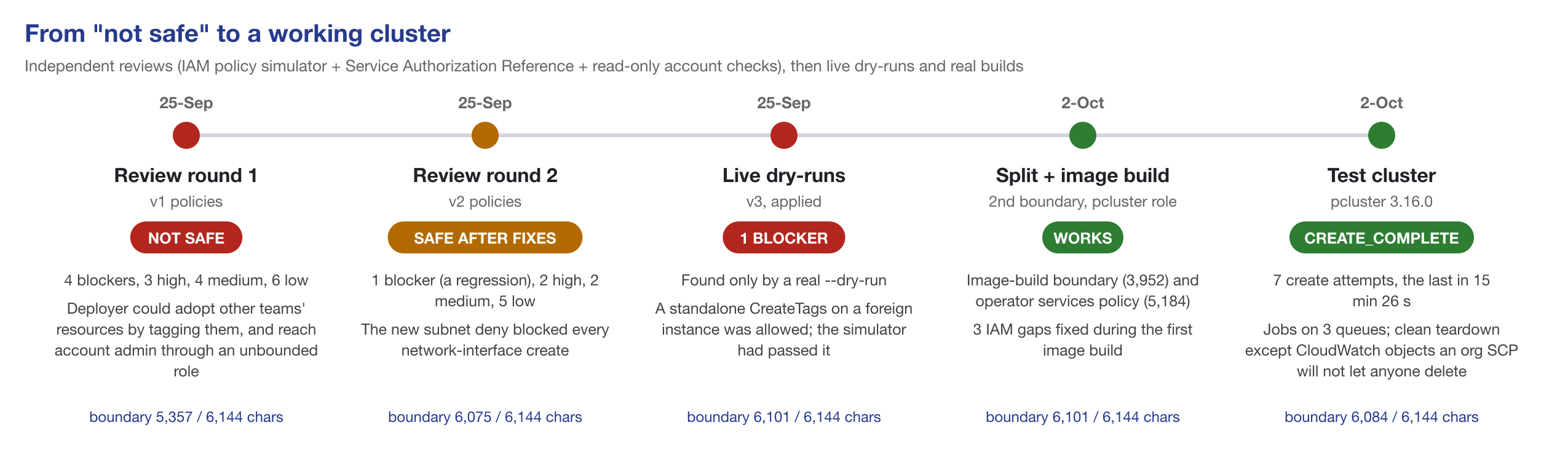
Each review round rendered the real policy JSON from the Terraform (read-only plan, local backend), checked every action and condition key against the Service Authorization Reference, ran iam simulate-custom-policy for allow and deny scenarios (the boundary was simulated against an allow-all identity policy, so the test measures the ceiling), and looked at the live account read-only. Both rounds were done by a separate AI security-review agent with exactly those tools and no write access; we fixed the findings and re-ran.
- Round 1: NOT SAFE. 4 blockers, 3 high, 4 medium, 6 low. The blockers: adopting other teams’ RDS, EFS, Lambda, DynamoDB, CloudFormation and Backup resources by tagging them; creating a Systems Manager association that runs a root shell on every managed instance in the account (IAM checks the association, not its
Targets, so our per-instance SSM deny never fired); account admin through the unbounded legacy role; and an EC2 ownership deny that also blocked the SSM agent’s own calls, so no bounded instance could register with Systems Manager at all. - Round 2: SAFE AFTER FIXES. 1 blocker (the ENI-create regression above), 2 high (EC2 wildcards that re-opened
DeleteTagson the shared VPC and several reserved-instance calls; a secret named outside our scope), 2 medium, 5 low. - Round 3: live dry-runs as the deployer. Allowed where they should be (an ENI and a security group created and tagged in an HPC subnet, stopping our own instance), denied where they should be (an ENI in a non-HPC subnet, an untagged ENI, terminating a foreign instance,
DeleteTagson the shared VPC, anything in another region, assuming the role under another person’s session name), and theCreateTagsblocker the simulator had missed.
After that, real builds: the Packer golden AMI (every call by the deployer role, no denials in CloudTrail), pcluster build-image (three IAM gaps, each fixed and re-applied: CloudFormation’s read-after-create, sns:Publish, AMI tagging), and a full test cluster as LabPclusterRole. That took seven create attempts. Most failures were a control behaving differently from what ParallelCluster expects: the untagged launch templates, the proxy allow-list, a KMS key in another account that encrypts the cluster AMI, one missing DynamoDB table in the boundary, and the two validators above. One was ours (an sshd_config detail in the image). The CloudWatch SCP made the failed attempts hard to clean up. The last attempt reached CREATE_COMPLETE in 15 minutes 26 seconds, ran jobs on all three queues, read Slurm accounting from RDS, and tore down cleanly apart from the CloudWatch objects the SCP would not let anyone delete at the time.
What is still open
We would rather list these than have you find them:
- Our own launch template naming a foreign security group.
CreateLaunchTemplatedoes not authorize security groups, so no IAM condition can catch it. We reviewSecurityGroupIdsin every cluster config instead. - Launching from another team’s launch template. Since launch templates are allowed by origin (CloudFormation) rather than by tag, the tag check that used to block this is gone. Accepted, flagged to the client.
- Trust-policy contents. No IAM condition key constrains what an
UpdateAssumeRolePolicydocument says, so a/lab/role could be made assumable from an outside account. The operators cannot assume/lab/roles themselves; an IAM Access Analyzer external-access finding on the path is the backstop. logs:TagResourceon/aws/lambda/pcluster-*is granted on the request tag, so a deliberate call could tag another team’s ParallelCluster Lambda log group. Low value, accepted.- “The HPC subnets are ours” is an assumption the network design has to keep true. The deployer may manage untagged EFS mount-target ENIs inside those subnets.
- Node-level secrets. Every cluster node can read every secret under our namespace; per-node prefixes are on the list before production.
Downloads, and why there is no GitHub repo (yet)
Download the example policies (zip): sanitised copies of four of the deployed policies, with a README listing every placeholder to replace.
workload-boundary.json: the boundary for every role ParallelCluster creates (6,100 characters).image-build-boundary.json: the boundary for the build-image pipeline roles.pcluster-operator-services.json: the ParallelCluster-only part of the operator role.deployer-iam.json: the operator’s only IAM write grant (roles under/lab/, boundary required).
Every account ID, name, path, tag, subnet and region in them is a placeholder (111122223333, us-east-2, acme-hpc, /lab/, lab:managed). The sanitised files were checked with IAM Access Analyzer policy validation and with iam simulate-custom-policy allow and deny scenarios when we built the test set described below; they have not been re-deployed in that form.
The rest of the operator roles (EC2 create-and-tag, the name-scoped data services, and the deny sets for the shared network, Systems Manager, security tooling and the Terraform state) are written against one client’s account layout: its VPC, subnets, bucket and database naming, backup design and SCPs. Turning them into something you could apply elsewhere is real work, and a half-generalised guardrail is worse than none, so they are described here rather than published. If enough people want a reusable Terraform module, that is the thing to build, and this post is where I will announce it.
This also feeds our local-LLM evaluation
This work turned into a test set. I am currently grading local, open-weight models running on a Mac Studio against Claude on real HPC work (Part I covers the setup), and IAM policy authoring is one of the tasks. Four of the seven test items are sanitised versions of the policies in this post: the workload boundary, the image-build boundary, the pcluster operator’s services policy and the boundary-gated IAM grant. The other three start from the public AWS ParallelCluster reference policies. Each answer is scored by Access Analyzer and the policy simulator against allow and deny scenarios, including the traps above, plus the 6,144-character cap.
A teaser: the CreateTags trap is not just a human mistake. Claude Opus wrote the Null ec2:CreateAction version and failed the standalone-CreateTags check in 2 of 20 attempts at the workload boundary, and of 25 local-model attempts at that item exactly one passed. The full results are in Part II (future post).
Hope this helps someone stuck between “just give pcluster admin” and “no”. Corrections and better ideas welcome: dag@bioteam.net.
Appendix: copy-paste snippets
Placeholders as above. The tagging deny, in the form that survived the live dry-run:
{
  "Sid": "DenyEc2TagNotOurs",
  "Effect": "Deny",
  "Action": ["ec2:CreateTags", "ec2:DeleteTags"],
  "Resource": "*",
  "Condition": {
    "StringNotEquals": { "aws:ResourceTag/lab:managed": "true" },
    "StringNotLike": {
      "ec2:CreateAction": [
        "RunInstances", "CreateFleet", "CreateVolume", "CreateNetworkInterface",
        "CreateSnapshot*", "CopySnapshot", "CreateLaunchTemplate*"
      ]
    }
  }
}
Statements for the operator’s deny policy; they keep its IAM grant honest (the matching allow is deployer-iam.json in the zip):
[
  {
    "Sid": "DenyChangingUnboundedRoles",
    "Effect": "Deny",
    "Action": [
      "iam:CreateRole", "iam:PutRolePermissionsBoundary", "iam:AttachRolePolicy", "iam:PutRolePolicy",
      "iam:UpdateAssumeRolePolicy", "iam:UpdateRole", "iam:UpdateRoleDescription", "iam:DetachRolePolicy",
      "iam:DeleteRolePolicy", "iam:DeleteRole"
    ],
    "Resource": "*",
    "Condition": {
      "StringNotEquals": {
        "iam:PermissionsBoundary": [
          "arn:aws:iam::111122223333:policy/lab-guardrails/LabPermissionsBoundary",
          "arn:aws:iam::111122223333:policy/lab-guardrails/LabImageBuildBoundary"
        ]
      }
    }
  },
  {
    "Sid": "DenyBoundaryRemoval",
    "Effect": "Deny",
    "Action": ["iam:DeleteRolePermissionsBoundary", "iam:DeleteUserPermissionsBoundary"],
    "Resource": "*"
  },
  {
    "Sid": "DenyAllRoleAssumption",
    "Effect": "Deny",
    "Action": ["sts:AssumeRole", "sts:AssumeRoleWithWebIdentity", "sts:AssumeRoleWithSAML", "sts:GetFederationToken"],
    "Resource": "*"
  },
  {
    "Sid": "DenyGuardrailTamper",
    "Effect": "Deny",
    "NotAction": ["iam:Get*", "iam:List*", "iam:SimulatePrincipalPolicy"],
    "Resource": [
      "arn:aws:iam::111122223333:policy/lab-guardrails/*",
      "arn:aws:iam::111122223333:role/lab-guardrails/*"
    ]
  }
]
The ParallelCluster config lines:
CustomS3Bucket: acme-hpc-automation
Iam:
  PermissionsBoundary: arn:aws:iam::111122223333:policy/lab-guardrails/LabPermissionsBoundary
  ResourcePrefix: /lab/
Scheduling:
  Scheduler: slurm
  SlurmSettings:
    Dns:
      DisableManagedDns: true
      UseEc2Hostnames: true
Monitoring:
  Dashboards:
    CloudWatch:
      Enabled: true   # needs cloudwatch:DeleteDashboards at delete time
  Alarms:
    Enabled: true     # needs cloudwatch:DeleteAlarms at delete time