
Local LLMs for real HPC work — a series
- Part I: Two Macs, a test harness, and the speed numbers (this post)
- Part II: Writing complex real-world AWS IAM policies (published 20-Oct-2026)
- Part III: Schrödinger postmortem root cause analysis (published 27-Oct-2026)
- Part IV: Letting a local model audit and fix a repo on its own (future post)
- Part V: Giving agents just enough tools: sandboxes, proxies and read-only MCPs in a test harness (future post)
Obsolete by the time you read this …
Added the afternoon of 15-Oct-2026. Everything after this section is as published that morning.
This post went live at 10:00 AM Eastern on 15-Oct-2026. By lunchtime a fair chunk of it was out of date, which is a pretty good illustration of what writing about local LLMs is like right now.
- A new oMLX came out about six hours before the post did. oMLX 0.7.1.dev2 was tagged at 4:17 AM Eastern, so the “Model server” row in the hardware table below was stale at publish time. I upgraded the mini over lunch and re-ran the benchmark: the everyday Qwen3.6-35B-A3B went from 86.3 to 102.7 tok/s on short decode (+19%) and from 84.5 to 95.0 on long decode. Prefill and the other four models stayed flat. The Studio stays on the older release until my current IAM runs finish, because swapping the server under a running evaluation makes its results incomparable with the earlier runs.
- The same release added a second inference engine. oMLX can now hand Qwen3.8-27B and Qwen3.6-35B-A3B models to Splash, a separate Metal engine built around DFlash2 speculative decoding: a small, separately trained draft model proposes a block of tokens and the big model verifies them. Splash 1.0 came out on 18-Sep and has had nine releases since. None of my own quants would load in it (they store their unquantized tensors as FP16 and Splash wants BF16), so I downloaded a plain 4-bit Qwen3.6-35B-A3B and ran the exact same weights through both engines on the mini:
| Qwen3.6-35B-A3B 4-bit on the mini | oMLX’s MLX engine | Splash 1.3.2 + DFlash2 draft | Splash / MLX |
|---|---|---|---|
| Decode, 500 tok (greedy) | 111.7 tok/s | 190.9 tok/s | 1.71× |
| Four requests at once, 500 tok each (aggregate) | 119.1 tok/s | 277.9 tok/s | 2.33× |
| Long decode, 4K tok (thinking on, normal sampling) | 106.4 tok/s | 103.0 tok/s | 0.97× |
| Prefill ~32K | 773 tok/s | 788 tok/s | flat |
Note: one run per row, on one box. Splash nearly doubles greedy decode and more than doubles throughput with four requests in flight, which lines up with the claims in its README. Tool calls, JSON-schema output and the reasoning split all came back clean on both engines. But with thinking on and normal sampling, which is the case that looks most like an agent turn, it gained nothing in my run. And because this plain 4-bit quant has no MTP heads at all, my “get the quant that keeps the MTP heads” lesson further down is now a “for now” lesson.
- NVIDIA released Nemotron 3.5 an hour after the post went up (announcement). Nemotron 3.5 Super VL is a 120B-total / 12B-active model with image input, aimed at agents. Nemotron 3.5 Bolt 74B-A9B 24GB uses a native 2-bit quantization to fit a 74B model into 24 GB, which is small enough for the mini. Both are open-weight under the OpenMDW license. As of this afternoon there is no MLX build of either, and the oMLX release I run doesn’t know the new architecture yet, so for now they go on the list.
The background churn is just as fast. oMLX has tagged 25 releases since 1 August. Three of the quants in my model table below have already disappeared from Hugging Face. Laguna-S-2.1 landed on the Studio the day before this post. My own IAM test is on its fourth version in two weeks, once because I found flaws in my own grader and twice because the better local models kept catching up and I needed harder tasks.
The to-test list as of this afternoon:
- Nemotron 3.5 Super VL on the Studio, once there’s an MLX build and oMLX support for the architecture.
- Nemotron 3.5 Bolt 74B-A9B on the mini: a 74B MoE in 24 GB is exactly the kind of model that box exists for.
- Splash as the mini’s default engine: first I need to check that the 4-bit quant is as good at my utility jobs as the 6-bit one I run today.
- The Studio on oMLX 0.7.1.dev2 with a full re-bench, once the evaluation queue drains.
If you’re reading this a month from now, assume every number below has significantly changed!
Overview
Let’s get this out of the way first — I am one of the morons who spent ~ $10,000+ on Apple hardware specifically to test local LLM performance and use cases. My reasons for this include:
-
I worry that subsidized AI pricing may not last or may not be affordable for small organizations. I am one of the people hugely benefiting from “subsidized AI” in that BioTeam uses an Anthropic Claude Teams subscription for frontier LLM access. We pay monthly subscription fees rather than raw API costs although we do use some API-based Anthropic models via AWS Bedrock running in one of our AWS accounts. I fear a scenario in the future where we can’t afford the “real costs” of frontier LLM access and usage and we may need to modify our behavior to use frontier LLMs to create execution runbooks for open source local LLMs to execute on as a way of saving money.
-
I worry about classifiers on frontier AI systems. I’ve been kicked out of Anthropic Fable more than a few times when the biosafety classifiers decided that an Ansible playbook containing reference to a CryoSparc software download URL or a git repo specific to installing Schrodinger computational chemistry software was “a safety risk”. BioTeam is in the process of applying for the Life Science Verification Program however I still need a hedge or backstop against potentially losing access to hosted LLMs due to over-zealous classifier behavior backed by no human review or support.
-
I worry about the supply chain over the next two years My Pharma and biotech clients need more LLM and inference power. Given what I see in the supply chain these days and how noisy and power-hungry the traditional GPU servers are I think that we may see life science people deploying Apple Silicon servers onto desktops and into quiet office environments. Although the cost of the Mac Studio is high it is not too high for an enterprise purchase, nor too high to serve as a backstop inference platform during a period of turmoil in the IT supply chain. If my clients start to think they need Apple Silicon on their desks or in their offices I need to be ahead of the curve and have experience with how these systems perform and work.
-
I worry about privacy and am interested in local LLM sovereignty More of a personal thing but I want to see how far I can take private/personal systems in this space. The rate of innovation in the Apple Silicon and Local LLM market is incredible and amazing to watch as an outsider. I want a front row seat to this revolution.
My homelab testbed
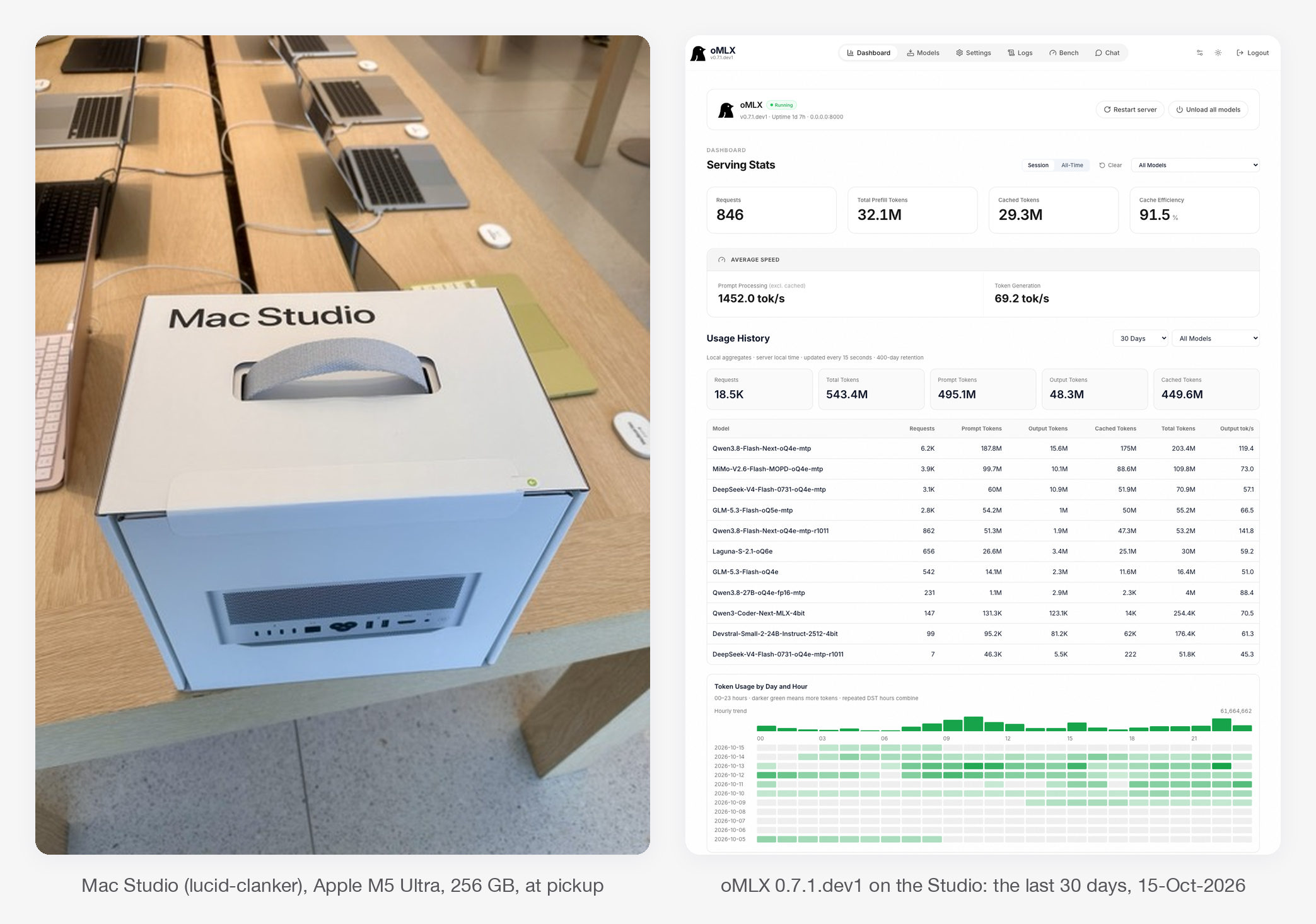
I run two Apple Silicon boxes at home as local LLM servers: a Mac Studio (M5 Ultra, 256 GB) that hosts the big open-weight models I’m testing, and a Mac mini (M4 Pro, 64 GB) that runs small, always-on utility models.
Both serve models through oMLX and sit on my Tailscale network. On the one model both boxes run, the Studio decodes 3.5× faster (125.4 vs 36.3 tok/s) and prefills a 30K-token prompt 13× faster (1,626 vs 121 tok/s): 18 seconds to first token versus 4 minutes. Those numbers are the boring part. The interesting part is that throughput tells you nothing about whether a model gets real work right, and that’s what Parts II-IV are about.
Why I’m doing this — can local models work for HPC related consulting tasks?
A lot of my consulting work at BioTeam touches material that shouldn’t leave the building: client cluster logs, client IAM policies, interview notes, job postmortems. A model running on a box I own makes the “where does this text go?” question go away. It also costs nothing per token once the hardware is paid for, and it keeps working when the cloud API is having a bad day.
The open question is whether any open-weight model is actually good enough at the work. Good enough means my work, not a leaderboard. So I built a harness that grades local models against frozen Claude baselines on tasks lifted from real engagements, and scores them with machine graders wherever I can. This post covers the setup and the plumbing; the grading results are the rest of the series.
Edited 16-Oct-2026, after a colleague pointed out what the sentence above leaves out.
“Any open-weight model” is too generous. Every model in these tests is a quantized copy (4- to 6-bit weights, with a few 8-bit tensors) of a model whose publisher trained and evaluated it at 16-bit, and I can only run the ones that fit inside a 256 GB box with room left for a long context. The unquantized versions of the big models below would need roughly 570-640 GB; I have no way to run them, so I can’t tell you how much of any miss is the quantization and how much is the model.
So what this series tests is not “open-weight models”. It is the combination a small organization can actually buy and plug into a wall: the best open-weight models that fit, at the precision that fits, on a quiet server that sits on a desk. The question is whether that can do the work I currently hand to a frontier model, and the honest early answer is “some of it, slowly” — the trend is good, the speed gap is the largest concern. Local LLM models are EXTREMELY SLOW relative to frontier performance. Whether a pair of 256 GB servers, or the dual 512 GB configuration Apple announced, changes the answer is a question I can’t afford to test yet.
The two test units
| Mac Studio | Mac mini | |
|---|---|---|
| Hostname | lucid-clanker |
lucid-nonsense |
| Chip / memory | M5 Ultra, 256 GB unified | M4 Pro, 64 GB unified |
| OS | macOS 27.0 | macOS 27.0 |
| Model server | oMLX 0.7.1.dev1 | oMLX 0.7.1.dev1 |
| Memory available to models | ~243 GiB | ~52 GiB |
| Job | Hosts every model I evaluate (up to ~235 GB resident) | Small always-on utility models: inbox triage, cold-outreach tagging, quick everyday questions |
The two boxes run different models on purpose. The mini can’t hold any of the large models I evaluate, and it doesn’t need to: its job is cheap, fast, high-volume calls. The Studio exists to answer the expensive question, which is whether a big open-weight model can do work I currently pay a frontier model for.
Both run oMLX (source on GitHub), an MLX-based server that speaks the OpenAI and Anthropic APIs, loads and evicts models against a memory ceiling, and supports multi-token prediction (MTP) for models that include the extra prediction heads. Both are on my Tailscale network, so my laptop can drive either one from anywhere.
The models
Every model here is an open-weight checkpoint in an MLX “oQ” quantization (mixed 4- to 8-bit, made by community quantizers), downloaded from Hugging Face. Stats come from each publisher’s model card and the checkpoint’s own config; “what I found” comes from my own runs. All ten support tool calling and a thinking (reasoning) mode. Edited 16-Oct-2026: the “Box” and “On disk” columns are the whole selection rule. The Studio has ~243 GiB for models, so the biggest models I can test are 280-320B-parameter mixtures at 4-5 bits (154-209 GB on disk); their BF16 originals are 570-640 GB and were never candidates. The mini’s ~52 GiB caps it at 25-35B models. Anything the publishers ship that doesn’t fit at 4 bits isn’t in this series at all.
| Model | Lab | Params (total / active) | Type | Native context | Image input | Box | On disk |
|---|---|---|---|---|---|---|---|
| Qwen3.8-Flash-Next | Alibaba Qwen | 125B / 6B | MoE | 262K (1M ext.) | yes | Studio | 99 GB |
| MiMo-V2.6-Flash-MOPD | Xiaomi | 309B / 15B | MoE | 1M | in the weights, untested | Studio | 160 GB |
| DeepSeek-V4-Flash-0731 | DeepSeek | 284B / 13B | MoE | 1M | no | Studio | 154 GB |
| GLM-5.3-Flash (4- and 5-bit) | Z.ai | 320B / 18B | MoE | 1M | in the weights, untested | Studio | 169 / 209 GB |
| Laguna-S-2.1 | poolside | 118B / 8B | MoE | 1M | no | Studio | 86 GB |
| Qwen3.8-27B | Alibaba Qwen | 27B | dense | 262K (1M ext.) | yes (and video) | both | 17 GB |
| Qwen3.6-35B-A3B | Alibaba Qwen | 35B / 3B | MoE | 262K | yes | mini | 28 GB |
| Gemma-4-26B-A4B-it | Google DeepMind | 25.2B / 3.8B | MoE | 256K | yes | mini | 16 GB |
| MiMo-V2.6-Distill-Qwen-9B | Xiaomi | 9B | dense | 262K | in the weights, untested | mini | 11 GB |
| Qwen3.6-27B | Alibaba Qwen | 27B | dense | 262K | yes | mini | 16 GB |
“Active” is the slice of a mixture-of-experts (MoE) model that runs for each token. That’s why, on the same mini, the 35B Qwen MoE with 3B active decodes at 86 tok/s while the dense 27B crawls at 33. Most of these use some form of linear or sliding-window attention for the bulk of their layers, which is what makes 256K-1M contexts affordable in memory. I configure most of them to 262K on the Studio; DeepSeek is the only one running at its full 1M.
On the Studio
- Qwen3.8-Flash-Next (model card, quant I run). Alibaba’s card calls it an experimental preview of the architecture behind Qwen4: a hybrid of Gated DeltaNet linear attention and sparse attention, built for long-context agentic work. Image input, thinking with effort levels, MTP. What I found: the fastest model I have by a wide margin, the best local model on my Schrödinger postmortems (14 of 15 passed), and the only model I’ve run on my inbox-classification set to get all 64 emails right. It’s a step behind MiMo on IAM, and turning long meeting transcripts into notes is not its thing (it lost all 14 comparisons against Opus; no local model won one).
- MiMo-V2.6-Flash-MOPD (model card, quant). Xiaomi’s 309B agentic model; “MOPD” is a post-training recipe that distills several specialist teachers into one model and is meant to cut down on repeated tool calls. The full model takes image, video and audio, but I have only used it for text. What I found: my best local model on IAM with tools (the closest to Opus), and a perfect 96/96 on the audit-and-fix suite, tied with Opus. It’s also the slowest to finish hard agentic work: a median of 8 minutes per postmortem, and over two hours per attempt on the newest (hardest) IAM task, where it fell into the same trap that occasionally catches Opus.
- DeepSeek-V4-Flash-0731 (model card, quant). DeepSeek’s agentic-coding release; text only, compressed sparse attention for cheap 1M context. Its MTP head gets ~90% draft acceptance. What I found: slow and steady. It’s the slowest decoder on the Studio (52 tok/s) but scored 94/96 on audit-and-fix and holds up well on IAM with tools. Without tools it ran out of time a lot: one closed-book IAM suite took ~24 hours of Studio time across three attempts.
- GLM-5.3-Flash (model card, 5-bit quant; the 4-bit quant I also run is no longer on Hugging Face). Z.ai’s coding and agentic model, linear-attention hybrid, thinks at maximum effort unless told otherwise. What I found: the oddball. It’s the best local model at IAM without tools, and it got worse with them, twice writing the policy mid-session and then ending on prose. It’s the weakest on postmortems (8 of 15), naming the wrong root-cause category on the same incident every time, but the fastest local model on audit-and-fix (26 seconds per task, median). It always thinks, so I keep it out of quick utility jobs.
- Laguna-S-2.1 (model card, quant). poolside’s agentic-coding model, released under a permissive license (OpenMDW). Text only, thinking interleaved with tool calls, no MTP. What I found: so far I’ve only run it on IAM, where it is the “fast but doesn’t finish” example from the lessons below. Audit-and-fix and postmortem runs are queued.
- Qwen3.8-27B (model card, quant). A dense 27B with image and video input; small enough at 17 GB to run on both boxes, which is why it’s the head-to-head model below. What I found: 63/64 on inbox classification and 3/3 on a 62K-token, 3-needle retrieval test, but it truncated more than half (8 of 15) of my transcript-to-notes attempts. It hasn’t been through the agentic suites yet.
On the mini
- Qwen3.6-35B-A3B (model card; the MTP quant I run is no longer on Hugging Face). With only 3B active parameters it’s the mini’s everyday default and its fastest model (86 tok/s). It passed a 100K-token, 3-needle retrieval test with 4-bit KV-cache compression turned on.
- Gemma-4-26B-A4B-it (model card, quant). Google’s MoE with native function calling; thinking is off by default, which suits classification. What I found: it’s the default model for my cold-outreach email tagger, at 63/64 with every real pitch caught and a 1.7-second median answer.
- MiMo-V2.6-Distill-Qwen-9B (model card, quant). Xiaomi’s fine-tune of Qwen3.5-9B on MiMo-generated agentic data, published as a starting point for research. What I found: this little 9B runs my email triage (“does this thread need a reply from me?”). On my 40-thread labeled set it found 6 of the 10 real asks against 5 for the Studio’s Qwen3.8-Flash-Next, which is a tie within the noise and a much cheaper way to get it.
- Qwen3.6-27B (model card; the quant I run is no longer on Hugging Face). The previous-generation dense 27B. I keep it next to Qwen3.8-27B because it got a terse “think, then answer” test right where 3.8 skipped the thinking. It’s the clearest MTP story on the mini: 9.2 → ~30 tok/s.
Who’s good at what, so far
- Agentic repo fixing: MiMo, 96/96 (same as Opus). Qwen3.8-Flash-Next 95/96, DeepSeek 94/96, GLM (5-bit) 93/96.
- IAM policy writing with tools: MiMo is closest to Opus; Qwen3.8-Flash-Next and DeepSeek are a step behind; GLM and Laguna are well behind. Without tools, GLM leads the locals, and all of them trail Opus badly. Numbers in Part II.
- Schrödinger postmortems: Qwen3.8-Flash-Next (14/15), then MiMo (13/15), DeepSeek (11/15), GLM (8/15). Across 370 citations, none of the local models fabricated a log quote. On one incident, MiMo and Qwen found a cause that all three Opus attempts missed.
- Short classification: everything I tried scored 60-64 out of 64 on the inbox set; Qwen3.8-Flash-Next got all 64.
- Turning long transcripts into notes: no local model won a single comparison against Opus (0 wins, 3 ties, 70 losses). This is the one task where nothing local came close.
- Raw speed: Qwen3.8-Flash-Next on the Studio, Qwen3.6-35B-A3B on the mini.
The harness
Every test drives the model through the same agent harness I use for day-to-day work, oh-my-pi, with the same system prompt and the same tools for every contestant. Each task has a frozen baseline run by Claude Opus. A suite is versioned and becomes immutable once its baseline is registered, so a later “fix” to a test can’t quietly move the goalposts. Wherever possible a machine does the grading: AWS’s own policy validator and simulator for IAM, string-level checks against known root causes for postmortems, test suites for code fixes. Every score carries a confidence interval, because five samples of one model on one task vary more than you’d expect; in my IAM runs, re-running the same model moves the mean by about ±0.02.
How I really work with agents: specialized MCPs and RAG
None of this is about a model answering from memory. That’s not how we use agents at BioTeam for real work. The way we work is to pair the agent with specialized MCP servers and retrieval (RAG) systems, so every claim it makes can be checked against an authoritative source. The agent drafts, then gets challenged: is that slurm.conf parameter real in this Slurm version, does the Schrödinger Job Server really behave that way, does AWS’s own validator accept this IAM policy? The same tools enrich the work with version-specific detail the model never saw in training.
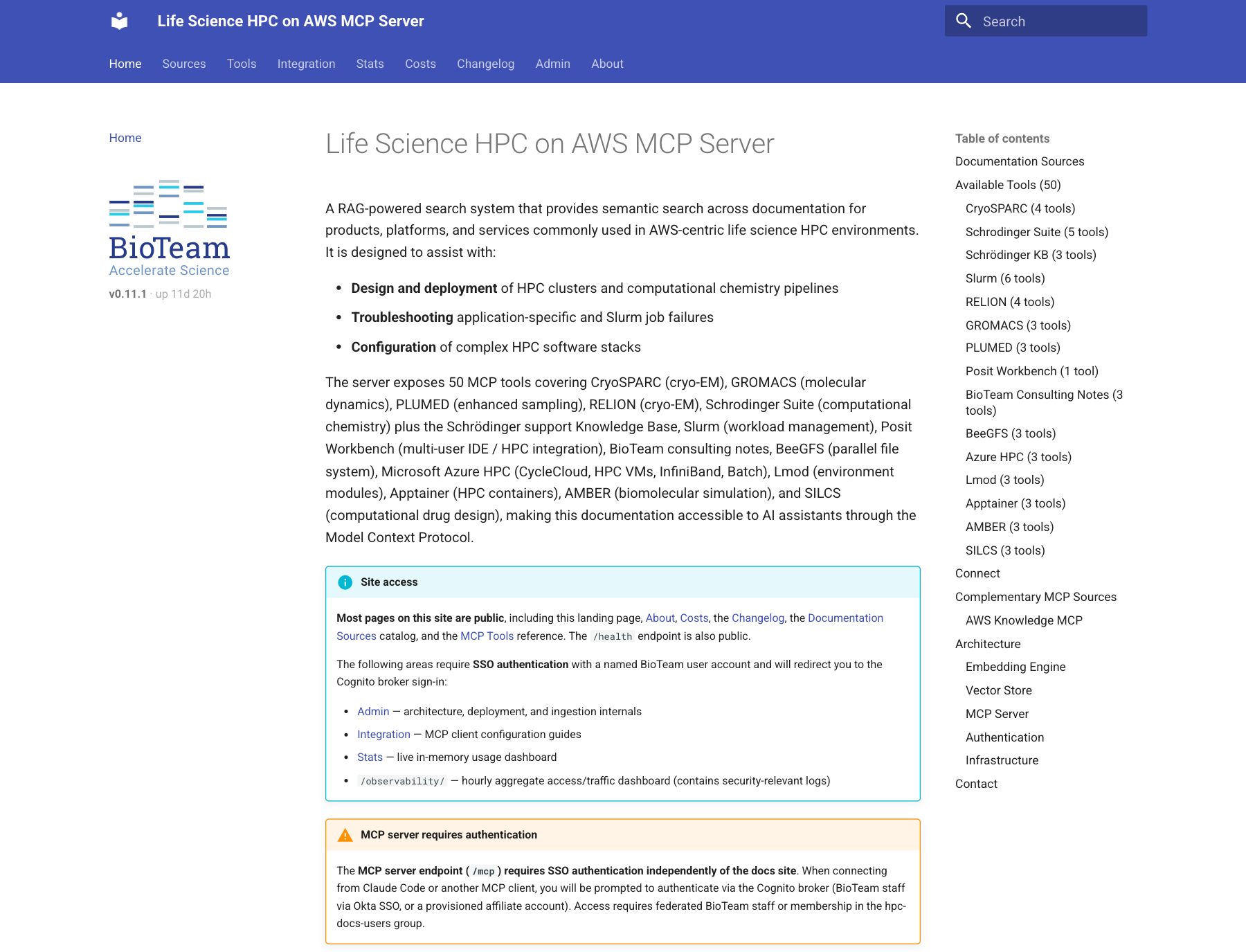
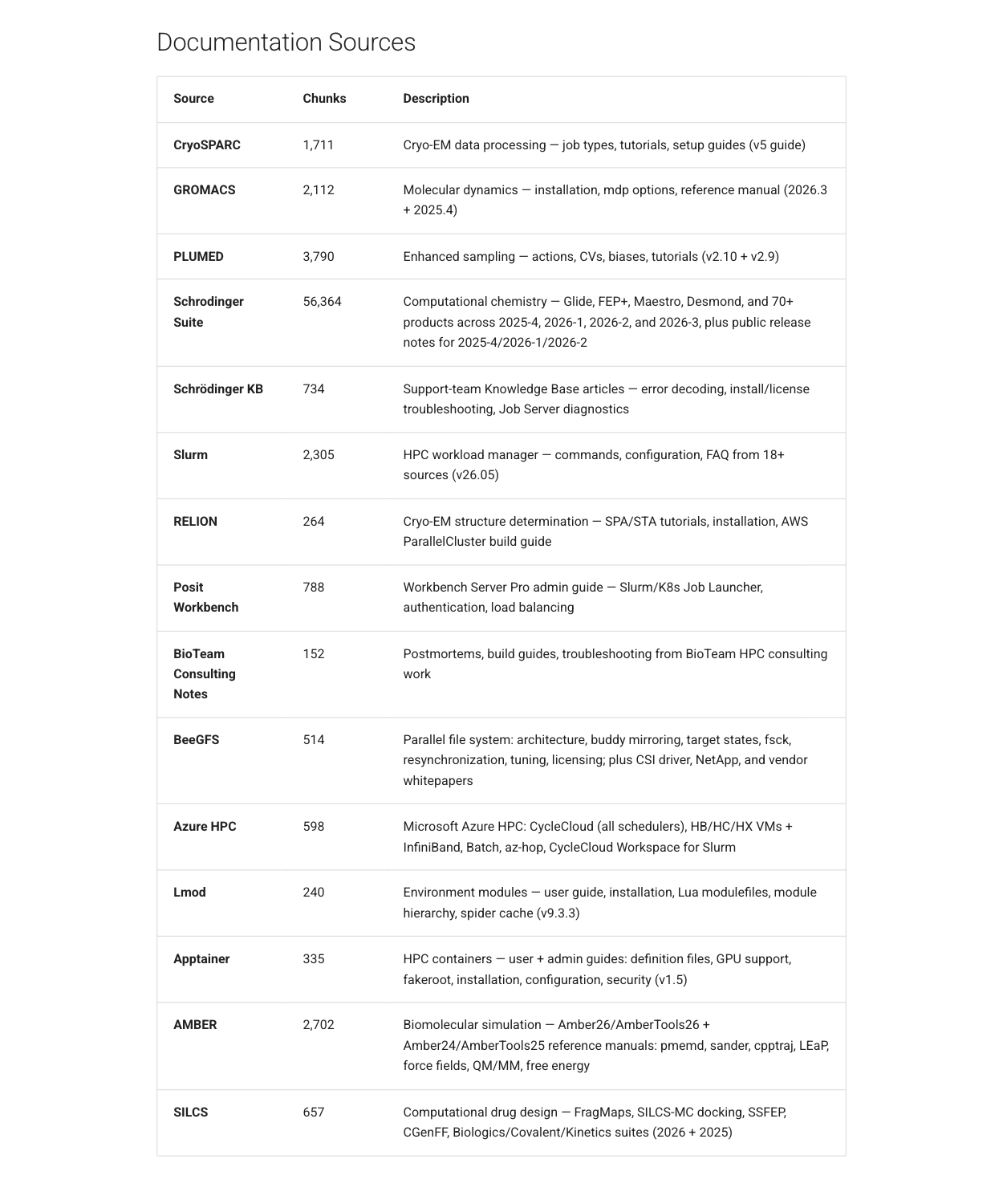
Our main one is the Life Science HPC on AWS MCP Server (we call it hpc-docs). It is a RAG search service over the documentation for the software our clients run, exposed to any MCP client as 50 tools across 15 sources. That’s ~73,000 indexed chunks today, more than 56,000 of them from the Schrödinger Suite docs alone, plus the Schrödinger support Knowledge Base, Slurm, CryoSPARC, RELION, GROMACS, PLUMED, AMBER, SILCS, BeeGFS, Lmod, Apptainer, Posit Workbench, Azure HPC, and our own sanitized consulting notes. For infrastructure-layer questions (ParallelCluster, PCS, FSx, EFA, IAM) it pairs with the AWS Knowledge MCP server.
The landing page, source catalog, tool reference, costs and changelog are public, so feel free to poke around. The MCP endpoint itself requires sign-in: BioTeam staff and approved collaborators.
For the evaluations, this means a local model that can’t use tools well is useless to me no matter how fast it decodes. So the work-specific tests give models tools on purpose, but only the tools a careful human would use and never the answer key:
- In the IAM tests the model gets four read-only tools: AWS Service Reference lookups and Access Analyzer’s validate-policy. It never sees the policy simulator or the probes that do the grading.
- In the Schrödinger postmortem tests every attempt runs in a macOS sandbox whose only network access is the model and an hpc-docs proxy. The proxy hides our own write-ups of the very incidents being tested, so the model can’t simply look up the answer.
How that plumbing works (sandbox profiles, the docs proxy, and keeping tool definitions from leaking between test arms) is a future post of its own (Part V).
The synthetic benchmark (not HPC or consulting specific)
The speed numbers come from a small script (bench.py) that measures four things per model, with the box otherwise idle:
- Load: first request after the model is evicted (wall time).
- Prefill: cold prompts of ~16K and ~32K tokens. A random nonce at the start of each prompt defeats the prefix cache, so the server has to process every token. Reported as prompt tokens / time-to-first-token.
- Decode: greedy, thinking off, 500 tokens, median of 3 warm runs.
- Long decode: the model’s default sampling with thinking on, 4,000 tokens. This is closer to what an agent turn looks like.
Decode tok/s is measured client-side over the stream: (completion tokens − 1) / (last token time − first token time). I didn’t finesse the data; the raw JSON for both boxes is available on request.
Mac Studio (M5 Ultra, 256 GB): oMLX 0.7.1.dev1, 11-Oct-2026 (Laguna 14-Oct)
| Model (quant) | Decode, 500 tok | Long decode, 4K tok | Prefill ~32K | Time to first token, ~32K |
|---|---|---|---|---|
| Qwen3.8-Flash-Next (oQ4e, MTP) | 193.4 tok/s | 120.6 | 5,176 tok/s ‡ | 5.7 s |
| Qwen3.8-27B dense (oQ4e, MTP) | 125.4 | 85.4 | 1,626 | 18.2 s |
| MiMo-V2.6-Flash (oQ4e, MTP) | 92.9 | 77.7 | 2,867 | 10.3 s |
| GLM-5.3-Flash (oQ5e, MTP) | 77.9 | 60.2 | 2,016 | 14.6 s |
| Laguna-S-2.1 (oQ6e) | 77.2 | 76.1 | 2,115 | 14.0 s |
| GLM-5.3-Flash (oQ4e) | 62.6 | 58.9 | 2,217 | 13.3 s |
| DeepSeek-V4-Flash (oQ4e, MTP) | 51.9 | 41.7 | 1,471 | 20.7 s |
‡ Note: in the original run every model on the Studio prefilled faster at ~32K than at ~16K (MiMo 1,919 → 2,867 tok/s; Qwen Flash-Next 2,042 → 5,176), while on the mini every model got slower at 32K, which is what you’d expect. My guess was a one-time warm-up cost on the first long prompt after a model loads. Update 17-Oct-2026: I reran the Studio bench with an extra, unmeasured ~16K prompt sent first. The 32K numbers came back within 5% of the ones in the table, and with the warm-up out of the way 16K and 32K are about the same (Qwen 5,187 / 5,308, MiMo 3,130 / 2,994). The slow first prompt doesn’t happen every time. On the rerun it didn’t show up at all; right after I moved the Studio to oMLX 0.7.1rc1 it hit three of seven models (Qwen’s warm-up prompt ran at 2,691 tok/s, the next one at 5,243).
Short answer: it is a warm-up cost, just not on every load.
Mac mini (M4 Pro, 64 GB): oMLX 0.7.1.dev1, 15-Oct-2026
| Model (quant) | Decode, 500 tok | Long decode, 4K tok | Prefill ~32K | Time to first token, ~32K |
|---|---|---|---|---|
| Qwen3.6-35B-A3B (oQ6, MTP), everyday default | 86.3 tok/s | 84.5 | 709 tok/s | 41.6 s |
| Gemma-4-26B-A4B (oQ4e, MTP), inbox tagging | 75.7 | 59.0 | 630 | 48.2 s |
| Qwen3.8-27B dense (oQ4e, MTP) | 36.3 | 24.7 | 121 | 244.4 s |
| Qwen3.6-27B dense (oQ4e, MTP) | 33.1 | 23.9 | 119 | 248.2 s |
| MiMo-V2.6-Distill-Qwen-9B (oQ8e), email triage | 18.7 | 27.7 | 398 | 74.2 s |
Yes, the 9B model is the slowest decoder on the mini. It’s a dense 8-bit model without MTP heads, and for triage it doesn’t matter, because the answers are a few dozen tokens long.
The one model both boxes run
Qwen3.8-27B (oQ4e, MTP) is installed on both, which gives a clean head-to-head:
| Mac mini | Mac Studio | Studio / mini | |
|---|---|---|---|
| Decode, 500 tok | 36.3 tok/s | 125.4 tok/s | 3.5× |
| Long decode, 4K tok | 24.7 tok/s | 85.4 tok/s | 3.5× |
| Prefill ~32K | 121 tok/s | 1,626 tok/s | 13.4× |
| Time to first token, ~32K | 244 s | 18 s |
Lessons learned so far
- Prefill is where the boxes really differ. A 3.5× decode difference is “faster”. A 13× prefill difference is “usable” versus “go get coffee”. The prefix cache hides most of it in a long agent session (91% of the Studio’s prompt tokens over the last 30 days came out of cache), but every cold start pays full price: a model load, an eviction, a new task. On the mini, a cold 30K-token context costs four minutes before the first token. That’s why my evaluations run on the Studio and the mini sticks to short-prompt utility work.
- Get the quant that keeps the MTP heads. Multi-token prediction is a lossless speed-up: the model proposes several tokens per pass and the full model verifies them. The community Qwen3.6 quants I started with had the MTP weights stripped during quantization, so oMLX refused to turn it on. On the mini, an MTP-preserving quant took the default MoE model from 63.2 to 77.3 tok/s (1.22×) and a dense 27B from 9.2 to ~30 tok/s, measured on an earlier oMLX release. Dense models gain the most because they are memory-bandwidth-bound and the extra verification is nearly free.
- Throughput tells you nothing about getting the answer right. The fastest model on the Studio isn’t the most accurate one on my IAM tests; a model at half its decode speed scores higher. Laguna, at a respectable 77 tok/s, timed out on 8 of 10 attempts at my two hardest IAM tasks under a one-hour budget, mostly by making tool calls (186 in one attempt). That gap between speed and correctness is the whole reason for Parts II-IV.
- A home-office box will wedge itself, quietly. This week the mini’s model server died without writing a single log line, and my email triage failed silently for a day and a half before I noticed. When I looked at the screen, the actual blocker was a Tailscale upgrade dialog waiting for a password, sitting next to a stack of out-of-memory alerts. The largest process at the time was a macOS video-decoding service that had been running for twelve days. A reboot fixed it. If you put one of these boxes in a workflow, monitor it, because it won’t tell you when it stops.
What’s coming
The next three posts grade these models on the work I do day to day, against Claude Opus, with machine graders, and a fourth shows the plumbing:
- IAM policy authoring (Part II): write a permissions policy from a written spec, under the 6,144-character managed-policy cap. Scoring comes from AWS IAM Access Analyzer and the IAM policy simulator, measured against a deploy-proven reference, with escalation probes that cap the score when the answer lets a role take over resources it shouldn’t. The newest task has a trap that catches even Opus some of the time.
- Schrödinger job root-cause analysis (Part III): hand the model the logs from a failed Schrödinger job plus a docs-search tool, and see whether it finds the actual cause or invents a plausible one.
- Agentic audit-and-fix (Part IV): point the model at a repository with planted problems and let it work unattended.
- Giving agents just enough tools (Part V): the sandbox profiles, the docs proxy that hides the answer key, and the read-only MCP tools that let a test measure how well a model uses tools without handing it the grader.
Short answer on whether a local model can do this work yet: for some of it, closer than I expected. Long answer: future posts.
Want the raw benchmark JSON? Drop me a note at dag@bioteam.net.