

Everything you never wanted to know about PCS and PCluster for Schrödinger Workloads but have been forced to find out
Why?
It’s rare for me to simultaneously work on ParallelCluster and PCS for the same workload, and I learned some things, enough to justify writing some words about it.
Hope someone finds it useful!
Drivers for this write-up
In early 2026, BioTeam is facing a growing number of requests for assistance in upgrading or altering client AWS-based HPC footprints. These are among my favorite projects to work on at BioTeam. The drivers for this include:
- Munge CVE.
A critical vulnerability (https://nvd.nist.gov/vuln/detail/CVE-2026-25506) was found in the munge authentication daemon — the component that validates every Slurm message and communication. This means existing ParallelCluster deployments need to be upgraded, or else your SecOps team is going to get mad. It’s not easy to just patch munge in place on older ParallelCluster versions; the scheduler, the head node AMI, and the authentication layer are all tightly coupled. - Python 3.9 Lambdas stop working in June 2026 – breaking Parallelcluster.
AWS has long been public about the planned end-of-life for the Python 3.9 Lambda runtime; this becomes “real” in June 2026, when Lambda functions using Python 3.9 will stop working entirely, which breaks ALL ParallelCluster versions older than 3.12.0. - Schrodinger’s release cadence.
Schrödinger has a quarterly release cadence for its suite of CompChem software, and our clients often have significant financial investments in Schrödinger product licensing – this means the pressure is on to get new releases integrated and in-use as soon as possible. Schrodinger version 2026-1 came out at just the right time to be included in all the other work. - CryoSparc v5.
Not chemistry related at all! Just a coincidence that CryoSparc v5 support is becoming increasingly important for us in early 2026. Version 5 of CryoSparc has been out for a while and
has upgraded its minimum supported software requirements for GPU devices, Driver/CUDA versions, and glibc. Given everything else happening in the AWS HPC space, this new requirement adds to the justification for rebuilding baseline “golden AMIs” or even making the jump to a new Linux major release (Ubuntu 22.04 LTS -> Ubuntu 24.04 LTS for example) while ParallelCluster itself is being upgraded and redeployed.
Finally, AWS PCS has been improving rapidly and has removed some of the prior blockers for Schrodinger integration (like license-aware scheduling support), so it was worth doing another head-to-head comparison.
AWS ParallelCluster vs Parallel Computing Service
- AWS ParallelCluster – https://aws.amazon.com/hpc/parallelcluster/
- AWS PCS – https://aws.amazon.com/pcs/
Here’s what both architectures look like when fully deployed (generic example).
BioTeam is fairly opinionated in how we integrate scientific applications on AWS HPC products. In particular we are fans of standing up independently-lifecycled persistent servers for critical functions like a Schrodinger JobServer or a CryoSPARC application server — we need these machines to persist independently of any cloud HPC cluster which can be destroyed and redeployed often. The diagrams and architecture below reflect our usage of persistent resources (storage, identity, application servers, login nodes, application servers) integrated into transient resources (HPC clusters).
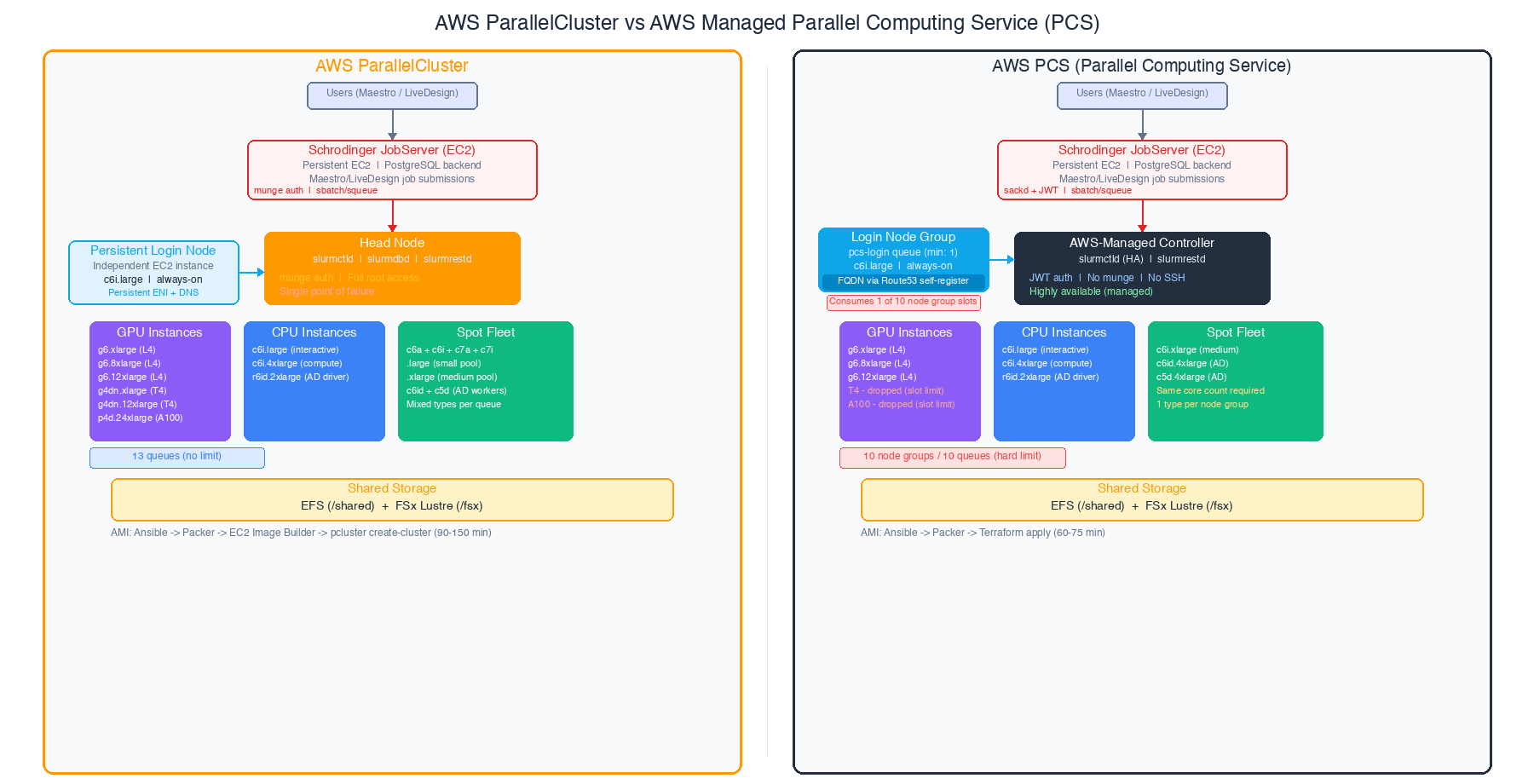
Major architectural differences between Parallelcluster and PCS:
- Head node vs managed slurm controller. ParallelCluster gives you an EC2 instance running slurmctld that you can SSH into, customize, and troubleshoot directly. PCS replaces this with an AWS-managed controller you never see. You gain HA; you lose direct access.
- Shared storage is identical. Both use EFS for general shared storage and FSx for Lustre for high-performance scratch. No difference here.
- Golden AMI pipeline. ParallelCluster requires an EC2 Image Builder layer on top of your input “parent AMI” — it needs to inject its own agents and bootstrap code and the smoothest path involves allowing it to install core software like GPU drivers and kernel level support for Lustre and EFA devices. PCS can use your input AMIs almost directly, with just the PCS Slurm agent installed. The PCS pipeline is simpler and about 30 minutes faster per build although anecdotally it takes much longer to build a PCS cluster via terraform.
- Slurm version and auth. ParallelCluster ships with a fixed Slurm version (tied to the ParallelCluster release). PCS also uses a compiled version of slurm built for you (Slurm 25.05 with JWT authentication in our recent test) — no munge daemon at all. This sidesteps the munge CVE entirely for PCS users.
Slurm Partition Considerations
This is where the platforms diverge, and it’s the main area where PCS development seems to be going in a different direction than the open-source ParallelCluster stack. The PCS concept of “Node groups” simply does not exist in ParallelCluster.
For this experiment, our client’s workload requires a substantial Slurm partition set. On ParallelCluster, the full deployment looks like this:
login (PCS can host internal "login" nodes and we wanted to test this)InteractiveCPUT4 GPU (single and multi)L4 GPU (single, IFD-MD, and multi)A100 8xGPUSpot CPU (small and medium sizes)Schrodinger AutoDesigner dedicated partitions (a driver node and Spot CPU workers)
That’s 13 queues or “Partitions” in Slurm nomenclature.
ParallelCluster handles this without breaking a sweat — there’s no hard limit on queues or compute resources. PCS has a hard limit of 10 compute node groups and 10 queues per cluster. This limit applies to ALL controller sizes (Small, Medium, and Large). It’s not adjustable, it doesn’t appear in the Service Quotas console, and AWS support cannot increase it. This was the single most impactful constraint I encountered.
Needing to support Schrodinger AutoDesigner alone consumed 3 of those 10 slots:
- ad-driver — r6id.2xlarge On-Demand, the orchestration node (needs NVMe local storage and memory)
- ad-spot-cpu-c6id — c6id.4xlarge Spot, primary worker fleet
- ad-spot-cpu-c5d — c5d.4xlarge Spot, secondary worker fleet
Why two separate Spot groups? Because PCS requires all instance types within a single node group to have the same default vCPU core count. On ParallelCluster, I’d put c6id.4xlarge and c5d.4xlarge in the same queue — they’re both 16 vCPU. But on PCS, they need separate node groups because the “default core count” definition is more restrictive than just matching vCPU counts.
What we had to drop from the PCS deployment:
| Slurm Queue/Partition | Why Dropped |
|---|---|
| T4 GPU (g4dn.xlarge) | Slot budget — L4 GPUs are faster and preferred |
| T4 multi-GPU (g4dn.12xlarge) | Same — L4 multi-GPU covers this |
| A100 8xGPU (p4d.24xlarge) | Rarely used, couldn’t justify a slot |
| Spot CPU small (mixed .large) | Merged workload into medium Spot pool |
In our view — the 10-slot limit is the first constraint to evaluate when trying to decide on PCS vs Parallelcluster. It is important to count your queues, count your Spot instance families (each needs its own node group), and see if everything will fit.
Why Schrodinger Needs Dedicated HPC Queues
If you’re not familiar with Schrodinger’s computational chemistry suite, you might wonder why the HPC partition design is so complex. Can’t we just throw everything at a single GPU queue and call it a day?
Not really. Schrodinger’s tools have wildly different resource profiles, and a middleware “jobserver” sits between the end user and the Slurm scheduler. I like the jobserver and the nice features it provides to the end user; however, it does complicate the Slurm integration side of things because the jobserver “hides” the slurm job submission arguments from the end-user without providing an easy way for an HPC-aware chemist to override or provide custom Slurm values when using the Maestro GUI.
- Glide docking (virtual screening) generates thousands of short CPU-only jobs. A single screening campaign can submit thousands of jobs in minutes. These are ideal for Spot instances — cheap, interruptible, and massively parallel.
- FEP+ and Desmond MD are long-running GPU-intensive simulations. A single FEP+ calculation can run for 12-24 hours on a dedicated GPU. These need On-Demand instances because a Spot interruption means restarting from scratch or a long slow recovery from checkpoint files
- IFD-MD (Induced Fit Docking with Molecular Dynamics) needs large instances with significant memory and a GPU. The
g6.8xlargegives you 32 vCPUs, 128 GiB RAM, and an L4 GPU — overkill for basic docking, but necessary here. - AutoDesigner is a generative design workflow that orchestrates its own sub-jobs. It needs a dedicated driver node (with NVMe scratch and significant memory) plus a fleet of CPU workers. The driver submits Spot CPU jobs itself, so you need separate queues the driver can target.
- Interactive sessions via Maestro need a responsive shell on a node with shared filesystem access. These can’t compete with batch jobs for resources or users will have a bad time.
Each of these workloads needs different instance types, different purchasing strategies (On-Demand vs Spot), different GPU configurations, and different resource limits. Slurm partitions (queues) are how you express all of this — and the Schrodinger hosts file maps each application workflow to the right partition.
The queue design is also tightly coupled to the Schrodinger JobServer. The JobServer uses a schrodinger.hosts (or hosts.yaml) configuration file that maps each application workflow to a specific Slurm partition with locked-down submission arguments — things like -p pcs-l4-gpu --gres=gpu:1 or -p pcs-ad-driver --mem=60G.
Maestro GUI users never see or modify these Slurm arguments directly; they just pick a “host entry” from a dropdown menu. This is by design — it prevents chemists from accidentally submitting a GPU job to a CPU-only queue or requesting the wrong resources. But it means every distinct resource profile needs its own partition and its own hosts file entry.
Here is an example Schrödinger.hosts file showing how Slurm arguments are embedded at the “-HOST” target level and not something that end-user can easily customize or change on their own. Look specifically at the “qargs” line — this generally means that Schrodinger end-users can’t directly alter the HPC job submission attributes of their own work — the schrodinger.hosts file and the Schrödinger jobserver “owns” the specific arguments sent to the HPC job scheduler.
Examine the config for ‘autodesign-driver’ to see how the HPC job submission forces “—-exclusive” node use and overrides TMPDIR to use a shared lustre parallel filesystem. This is because the “driver” partition manages a much larger workload involving many subtasks and subjoins, all coordinated and submitted by the middleware Schrödinger jobserver.
#### -----
#### Research HPC Platform (EFS jobserver variant)
#### -----
name: efs-cpu-q
host: efs-jobserver.hpc.example.com
queue: SLURM2.1
qargs: --partition=cpu-q --ntasks=%NPROC%
schrodinger: /shared/sw/schrodinger/2025-4
processors_per_node: 16
processors: 160

name: efs-spot-cpu-q-small
host: efs-jobserver.hpc.example.com
queue: SLURM2.1
qargs: --partition=spot-cpu-q-small --ntasks=%NPROC%
schrodinger: /shared/sw/schrodinger/2025-4
processors_per_node: 2
processors: 400

name: autodesign-driver
host: efs-jobserver.hpc.example.com
queue: SLURM2.1
qargs: --partition=ad-driver --ntasks=%NPROC% --exclusive
tmpdir: /fsx/scratch
schrodinger: /shared/sw/schrodinger/2025-4
processors_per_node: 8
processors: 8

name: efs-l4-gpu-q
host: efs-jobserver.hpc.example.com
queue: SLURM2.1
qargs: --partition=l4-gpu-q --ntasks=%NPROC% --gres=gpu:l4:%NPROC%
tmpdir: /shared/scratch
schrodinger: /shared/sw/schrodinger/2025-4
gpgpu: 0, Tesla L4
env: CUDA_CACHE_MAXSIZE=2147483648
env: CUDA_CACHE_PATH=/shared/scratch/cuda
processors_per_node: 4
processors: 64
cuda_cores: 5120
...
This is why the 10-queue PCS limit can affect Schrodinger deployments. A “simple” comp chem environment with Glide, FEP+, Desmond, IFD-MD, AutoDesigner, interactive use, and a login node already consumes 9-10 queue slots before we add any variant GPU types or Spot diversity.
Schrodinger License Management & Slurm
Schrodinger does not just license “applications” — the licensing model governs individual ‘features’ across many different tool or workflow classes. Not a big deal from a technical perspective but it does mean the HPC job scheduler needs to track and be aware of a very large set of license feature names and feature counts. Schrodinger uses Slurm’s built-in license tracking to manage concurrent feature usage across the cluster. When a user submits a job through Maestro or LiveDesign, the submission includes sbatch -L flags that request specific license features (e.g., glide_sp_docking:1). Slurm checks these against the Licenses= line in slurm.conf and holds the job in a pending state until the required licenses are available.
The licutil -slurmconf tool (shipped with Schrodinger) generates the license configuration string by querying the licenseserver and formatting every available feature with its token count.
For our deployment, this produced a string with 67 features totaling approximately 1,290 characters. It looks something like:
Licenses=glide_main:1200,glide_sp_docking:4200,desmond_gpgpu:1280,fep_gpgpu:640,...On ParallelCluster, you paste this directly intoCustomSlurmSettings in the cluster YAML. There’s no character limit. It just works.
With PCS, we hit an issue that caused a deploy failure.
The slurm_custom_settings parameter in the PCS API has a hard 1,024 character limit. This isn’t a Terraform limitation — the limit exists in the AWS CLI AND in the underlying API. There is no bypass. We confirmed this independently through the API, the CLI, and Terraform and AWS Support proactively sent us a note after noticing the failure (a cool attribute of a managed service!).
One potential workaround — using sacctmgr to manage licenses in the Slurm accounting database instead — doesn’t work with Schrodinger. The sbatch -L flag only reads the local Licenses= line in slurm.conf. It does not query the accounting database. This is a Schrodinger design choice, not a Slurm limitation.
The not-so-desirable ‘solution’ for us to continue the PCS trial was to analyze historical license usage across multiple sandbox and production ParallelCluster clusters. Using sacct queries going back to January 2024, we were able to identify 11 Schrödinger license features with zero usage:
- materialscience_* (8 features, ~195 characters) — materials science modules, not used in pharma drug discovery
- ffld_* (2 features, ~33 characters) — force field development tools
- combiglide_* (1 feature, ~25 characters) — combinatorial library design, low usage in this environment
Removing these 11 features brought the string from 1,290 characters down to 1,017 — just 7 characters under the limit. This works today, but it’s fragile. Every quarterly Schrodinger release could add new license features, and there’s no guarantee the string will stay under 1,024 characters. If Schrodinger 2026-2 adds three new features, we will need to find more to trim. This is a
maintenance burden that ParallelCluster simply doesn’t have.
Note: AWS PCS team has noticed the 1024 character limit problem. A fix is presumably in the works.
JobServer and AutoDesign Integration
The Schrodinger JobServer is the bridge between end users and the HPC cluster. It receives job submissions from Maestro (the desktop GUI) and LiveDesign (the web-based platform), translates them into Slurm sbatch commands, and manages the lifecycle of running jobs. For a multi-user scientific computing environment, it’s the critical piece that makes the cluster accessible to chemists who shouldn’t need to know what Slurm is.
The JobServer runs on a dedicated EC2 instance with a PostgreSQL backend for job tracking and an EFS-backed filestore for input/output data. It connects to the Slurm cluster as an external submit host, submitting jobs and polling for status. For the PCS deployment, we adopted a pcs- prefix naming convention for all queues (e.g., pcs-l4-gpu, pcs-cpu, pcs-ad-driver). This lets Maestro users see at a glance which partitions belong to the PCS cluster versus the ParallelCluster environment when both are available — useful during the evaluation period when we are running both side by side. The hosts file configuration maps Schrodinger job types to Slurm partitions with appropriate GPU GRES settings.
A simplified example:
name: pcs-l4-gpu
host: pcs-login.internal.example.com
queue: SLURM
qargs: -p pcs-l4-gpu --gres=gpu:1
tmpdir: /local-scratch
processors: 4

name: pcs-l4-gpu-ifd-md
host: pcs-login.internal.example.com
queue: SLURM
qargs: -p pcs-l4-gpu-ifd-md --gres=gpu:1
tmpdir: /local-scratch
processors: 32
One of the nicer aspects of the JobServer is its hot-reload capability. Running jsc admin reload-hosts picks up hosts file changes without restarting the service or interrupting running jobs. This made it straightforward to iterate on queue mappings during testing. JobServer works identically on both platforms. It doesn’t matter whether a PCS controller or a ParallelCluster head node manages the Slurm scheduler. It submits jobs viasbatch, checks status viasqueue, and retrieves results from shared storage. The integration effort is the same either way.
Operational Differences
This is where “operational burden” diverges between the two platforms.
- Queue changes on live clusters. On ParallelCluster, running
pcluster update-clusterAdding or modifying a queue triggers a CloudFormation update that drains ALL running compute nodes. Every running job gets a SIGTERM, nodes scale down, the update applies, and nodes scale back up. This takes 5-15 minutes and is disruptive to users as cluster downtime needs to be scheduled and announced if you don’t want running jobs to get a SIGTERM boot to the head. On PCS, adding a new node group or modifying an existing one through Terraform is non-disruptive — running jobs on other queues continue uninterrupted. This alone can be a significant operational advantage for environments with continuous workloads.- Note: I do a ton of Parallelcluster config updates involving only altering the compute fleet mix and configuration. In reality, I only need a ~60-minute outage window for an update. The update can go out in 15 minutes or less, and I use the remaining time to run job submission tests. Updating ParallelCluster does require downtime, but it’s not a huge dealbreaker for me. It’s just an end-user communication and outage window scheduling issue.
- Slurm configuration changes. On ParallelCluster, you can SSH into the head node, edit
slurm.conf, runscontrol reconfigure, and the change takes effect immediately. On PCS, any change toslurm_configurationthrough Terraform’sawsccprovider triggers a full cluster replacement — destroy and recreate. The workaround is to useaws pcs update-clustervia the CLI for runtime config changes, but this means Terraform state drifts from reality. Neither option is great. - Head node availability. ParallelCluster’s head node is a single EC2 instance. If it goes down, the scheduler is gone and no jobs can be submitted or managed until you recover it. PCS eliminates this single point of failure with an AWS-managed, highly available controller. For production environments running 24/7, this can
be a significant operational gain.- Note: This is why we are opinionated about persistent resources like dedicated login nodes. Slurm HeadNode failures are rare because we don’t let users touch the HeadNode. If they go wild on the Login node and crash it via running it out of memory or open file handles we don’t lose job scheduling or core slurm functionality. Worst case a lot of other end-users get annoyed and that tends to help “self-correct” future issues, heh.
- AMI updates. On ParallelCluster, updating the compute node AMI means: run Ansible+Packer to build the base image (minus GPU support, EFA support and Lustre support because Parallelcluster likes to install that itself), run EC2 Image Builder to layer ParallelCluster’s components on top, then run
pcluster update-clusterto roll out the new AMI. Total time: 90-150 minutes. On PCS, it’s just: run Ansible+Packer (the PCS agent is baked in during the Packer build), update the Terraform config, apply. Total time: 60-75 minutes. Fewer moving parts. - Failure recovery. ParallelCluster’s PROTECTED mode halts auto-scaling when compute nodes fail to launch after 10 consecutive attempts. In AWS autoscaling scenarios these failures can be common and ’normal’ because the errors could be transient like “EC2 insufficient capacity” and not a real persistent error like “you are out of quota, dummy”. You have to manually intervene to restart scaling. PCS automatically replaces unhealthy nodes without manual intervention. For Spot-heavy workloads, PCS’s self-healing behavior seems likely to reduce operational overhead.
- Note: ParallelCluster systems falling over into PROTECTED status is rare but not rare enough to ignore. It’s important to monitor and catch these errors as they flow through the Cloudwatch log groups. Sometimes PROTECTED status means you have a real issue requiring a human to intervene, but sometimes it gets triggered by a transient issue that self clears. However PROTECTED status never self-clears so a human has to step in. The faster you can alert on and respond to PROTECTED status, the better! See this blog post on wiring up ParallelCluster log streams to a Slack web hook for monitoring: https://bioteam.net/blog/tech/cloud/aws-parallelcluster-monitoring/
- External submit hosts. ParallelCluster uses standard Slurm configuration with munge authentication — install munge, copy the munge key, configure
slurm.conf, done. PCS usessackdwith JWT authentication. The JWT key is generated per-cluster, so if you destroy and recreate the PCS cluster, you must re-fetch the authentication key on every submit host. The key’s SSM parameter ARN stays the same, but the value changes. This bit me once during testing. We use SSM Parameter Store a lot to allow our ansible playbooks and other scripts to auto-discover key values without us having to bake them into git repos or config files.
AWS PCS vs ParallelCluster Cost Comparison
The cost delta between the platforms is significant at baseline, before any compute jobs run.
Monthly Baseline Costs
| Component | ParallelCluster | PCS (Medium) |
|---|---|---|
| Controller / Head Node | $53/mo (t3a.xlarge) | $2,440/mo (managed) |
| Always-on login node | $63/mo (c6i.large) | $63/mo (c6i.large) |
| Slurm accounting DB (RDS) | $86/mo (db.t3.small) | $0 (included) |
| PCS accounting fees | $0 | ~$200/mo (estimated) |
| PCS per-instance fees | $0 | ~$600/mo (estimated) |
| EFS + FSx Lustre | ~$1,400/mo | ~$1,400/mo |
| JobServer instance | ~$240/mo | ~$240/mo |
| Total baseline | ~$1,850/mo | ~$4,950/mo |
The delta is roughly $3,100/month — almost entirely driven by the PCS managed controller cost. V ariable compute costs (the GPU and CPU instances running actual jobs) are similar between the two platforms, though PCS adds a smallper-instance management fee on top of standard EC2 pricing.
PCS Controller Sizing
| Size | Max Instances | Max Jobs | Monthly Cost |
|---|---|---|---|
| Small | 32 | 256 | $436 |
| Medium | 512 | 8,192 | $2,440 |
| Large | 2,048 | 16,384 | $4,901 |
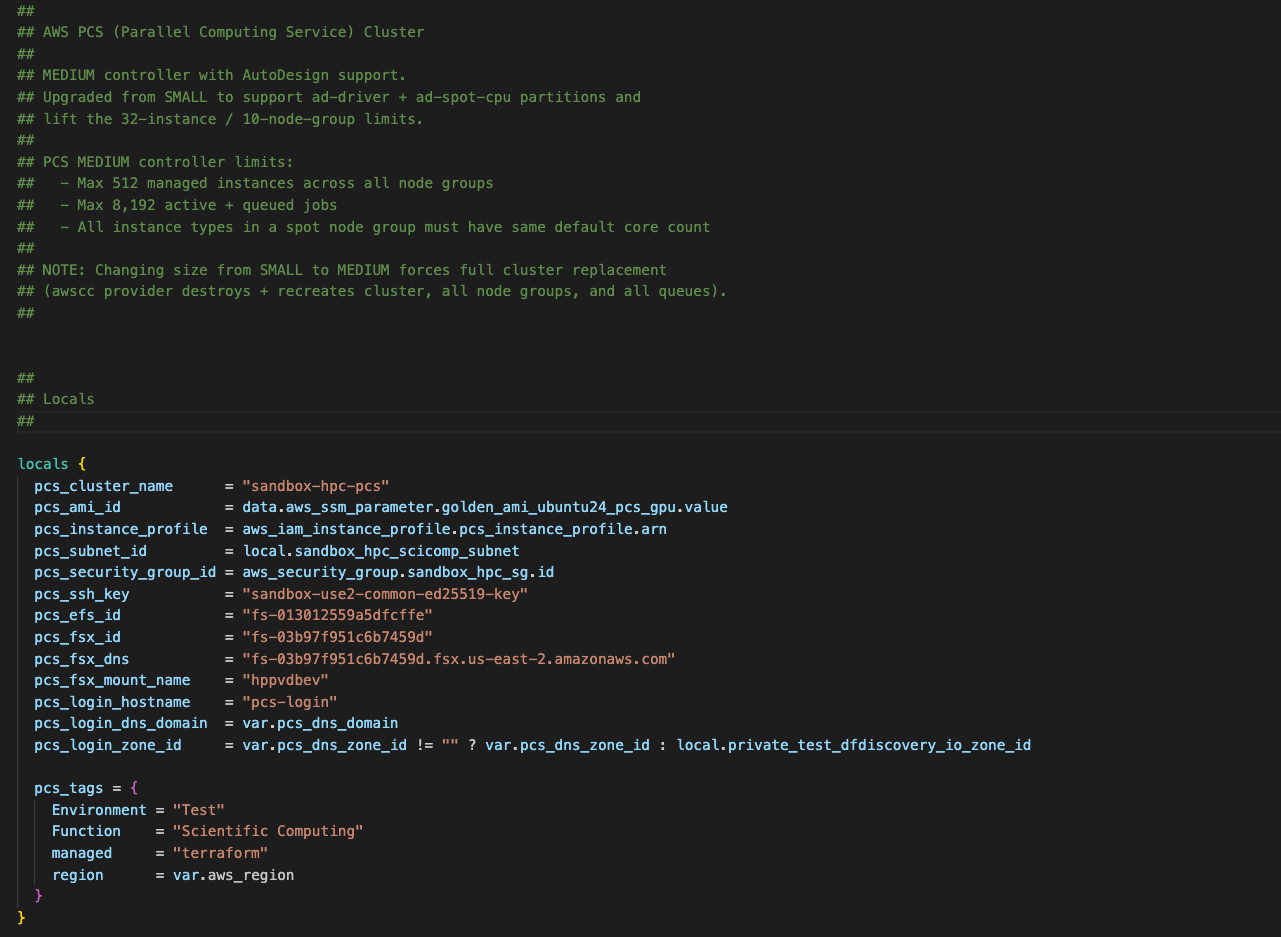
Controller size cannot be changed after creation. Choose based on your peak concurrent instance count and job queue depth. Most of our computational chemistry clusters can fit inside an AWS PCS Medium config; however, the 8,192 job limit is a deal-breaker for larger discovery-oriented environments where it is not uncommon to have 10,000 jobs or more active, running, or changing state. The caveat here, however, is that people with more than 9,000 active HPC jobs likely have some sort of scientific computing or HPC-aware support resource to help manage them.
Slurm RESTful API Considerations
I attempted to deploy Slurm-web 6.x (https://slurm-web.com/) as a monitoring dashboard for the PCS cluster — a web UI that shows job status, node health, and queue utilization. This requires a working slurmrestd endpoint.
PCS supports slurmrestd via a slurmRest: STANDARD mode that must be explicitly enabled (it’s off by default). JWT authentication to slurmrestd works correctly — external clients can authenticate and receive valid HTTP 200 responses from the endpoint. However, during this work we discovered that slurmrestd cannot communicate with slurmctld internally inside the PCS controller.
The ping diagnostic endpoint returns "pinged": "DOWN" for slurmctld-primary, with approximately 10 seconds of timeout before the failure response. All data queries — nodes, jobs, diagnostics — return error 1007 (“Protocol authentication error”). Meanwhile, sackd-connected submit hosts can run sinfo, squeue, and sbatch perfectly on port 6817 at the same time.
The scheduler is working; slurmrestd just can’t talk to it in our PCS deployment.
We then attempted remediation by running aws pcs update-cluster to re-apply the slurmRest configuration. No change. We then wrote a standalone test script that reproduces the issue without any Slurm-web dependencies, confirming it’s a platform-level problem. This is currently an open support case with AWS.
ParallelCluster does not have this issue. slurmrestd runs directly on the head node alongside slurmctld, communicating via local socket or loopback.
What works
- Cluster status shows ACTIVE in AWS console and CLI
- All 10 node groups and 9 queues show ACTIVE
- TCP connectivity succeeds to all three ports (6817, 6819, 6820)
- sackd-connected external submit hosts can run
sinfo,squeue,sbatchvia port 6817 - slurmrestd accepts JWT-authenticated requests (returns HTTP 200 on
/slurm/v0.0.41/ping)
What fails
slurmrestd/slurm/v0.0.41/pingreturns"pinged": "DOWN"forslurmctld-primarywith ~10,700ms latency (timeout)- All
slurmrestddata endpoints return HTTP 511 with error 1007 “Protocol authentication error”:/slurm/v0.0.41/nodes/slurm/v0.0.41/jobs/slurm/v0.0.41/diag
- This error means
slurmrestdcannot authenticate or communicate withslurmctldinternally
Evidence
slurmrestd ping response (authenticated, HTTP 200)
{
  "pings": [
    {
      "hostname": "slurmctld-primary",
      "pinged": "DOWN",
      "latency": 10711,
      "mode": "primary"
    }
  ]
}
slurmrestd nodes query (authenticated, HTTP 511)
{
  "errors": [
    {
      "description": "Failure to query nodes",
      "error_number": 1007,
      "error": "Protocol authentication error",
      "source": "_dump_nodes"
    }
  ]
}
sinfo via sackd (working, same cluster, same time)
PARTITION             AVAIL  TIMELIMIT  NODES  STATE NODELIST
pcs-l4-multi-gpu     up     infinite      2  idle~ l4-multi-gpu-[1-2]
pcs-ad-spot-cpu     up     infinite    160  idle~ ad-spot-cpu-c5d-[1-80],ad-spot-cpu-c6id-[1-80]
pcs-ad-driver           up     infinite      1  idle~ ad-driver-1
pcs-spot-cpu           up     infinite     50  idle~ spot-cpu-medium-[1-50]
pcs-l4-gpu               up     infinite     16  idle~ l4-gpu-[1-16]
pcs-interactive        up     infinite     10  idle~ interactive-[1-10]
pcs-cpu                    up     infinite     10  idle~ cpu-[1-10]
pcs-l4-gpu-ifd-md  up     infinite     20  idle~ l4-gpu-ifd-md-[1-20]
pcs-login                  up   infinite      1   idle login-1
Note: If slurmrestd / REST API access is critical to your workflow — monitoring dashboards, programmatic job queries, ntegration with external systems — test this thoroughly on PCS before committing.
Head-to-Head Comparison Tables
Architecture and Capabilities as of Early 2026
| Feature | ParallelCluster | PCS |
|---|---|---|
| Scheduler management | Customer-managed head node | AWS-managed controller (HA) |
| High availability | No (single head node) | Yes (managed) |
| Max queues | No hard limit | 10 per cluster |
| Max node groups | No hard limit | 10 per cluster |
| Deploy time (new cluster) | 20-30 min | 20-90 min (config dependent) |
| Slurm version | Tied to ParallelCluster release | 25.05 (AWS-compiled) |
| Authentication | munge | JWT (no munge) |
| LDAP integration | Direct config on head node | Via submit host / login node |
| Shared storage | EFS, FSx Lustre, EBS | EFS, FSx Lustre |
| Slurm accounting | Customer-managed RDS | Included (managed) |
| Spot instances | Full support, mixed types per queue | Supported, same core count per group |
| EFA networking | Supported | Supported |
Operational Differences
| Operation | ParallelCluster | PCS |
|---|---|---|
| Add/modify queue | Disruptive (5-15 min drain) | Non-disruptive |
| Slurm config change | SSH + edit + scontrol reconfigure |
API-only; Terraform = cluster replacement |
| AMI update | Packer + Image Builder + pcluster update (90-150 min) | Packer + Terraform apply (60-75 min) |
| Failure recovery | PROTECTED mode, manual intervention | Auto-replacement |
| Head node failure | Full outage until recovered | N/A (managed HA) |
| Submit host auth | munge key copy | sackd + JWT (key rotates on cluster recreation) |
| REST API (slurmrestd) | Works (local socket on head node) | Enabled but internal communication issues observed |
| Direct Slurm access | Full root on head node | No direct access to controller |
Schrodinger-Specific Considerations
| Aspect | ParallelCluster | PCS |
|---|---|---|
License string (Licenses=) |
No character limit | 1,024 character hard limit |
| Full license string (67 features) | Works as-is (~1,290 chars) | Must trim to fit (removed 11 features) |
| Queue naming | Standard Slurm partition names | pcs- prefix convention for Maestro visibility |
| JobServer compatibility | Full | Full |
| GPU GRES configuration | Standard Slurm GRES | Standard Slurm GRES |
| AutoDesigner queue impact | 2 queues (driver + mixed Spot) | 3 node groups (driver + 2 single-family Spot) |
| Hosts file management | Same | Same |
licutil -slurmconf output |
Direct paste | Must reduce character count |
Cost Summary
| Component | ParallelCluster | PCS Small | PCS Medium | PCS Large |
|---|---|---|---|---|
| Controller / Head node | ~$53/mo | $436/mo | $2,440/mo | $4,901/mo |
| Max managed instances | N/A | 32 | 512 | 2,048 |
| Max active + queued jobs | N/A | 256 | 8,192 | 16,384 |
| Per-instance mgmt fee | None | Yes | Yes | Yes |
| Accounting DB | Customer-managed RDS | Included | Included | Included |
| Controller size changeable | N/A | No | No | No |
Advice, Recommendations & Lessons Learned
If I were starting this evaluation from scratch, here’s the rough decision framework I’d use:
Start with ParallelCluster if you need more than 10 queues, your Schrodinger license string exceeds 1,024 characters (run licutil -slurmconf and count), you need slurmrestd for monitoring or integration, or you have an operations team comfortable with Slurm administration.
Start with PCS if you want zero scheduler operations overhead, you can fit your workload into 10 queue slots, your license string fits (or can be trimmed), and you’re willing to pay the controller cost premium for managed HA.
Check the license string first. Runlicutil -slurmconf against your license server and count the characters. If it’s over 1,024, you either need to identify unused features to trim or PCS is off the table. This is the hardest constraint to work around because there’s no API bypass and sacctmgr doesn’t help with Schrodinger.
Map your full queue design against the 10-slot limit before committing. Count every queue, count every Spot instance family that needs its own node group (remember: same core count required within a group), and count the AutoDesigner queues. If you’re at 9 or 10, you have no room to grow.
Budget for the controller cost delta. The Medium controller at $2,440/month versus a t3a.xlarge head node at $53/month is a real number. Run the TCO analysis for your expected usage pattern and make sure the operational benefits justify the spend.
Bottom Line
Neither platform is universally better; I like both.
ParallelCluster gives you more flexibility and lower cost at the price of operational responsibility. PCS gives you managed infrastructure and operational simplicity at the price of hard constraints on queue design and license management. The right choice depends on your workload shape, your team’s Slurm expertise, and whether the 10-queue and 1,024-character limits are deal-breakers for your specific deployment.
For a Schrodinger computational chemistry stack specifically, the license string limit and queue slot budget are the two constraints you should evaluate first — everything else is solvable.