
Good news: The 1024-character limit in the AWS PCS custom slurm configuration parameter that enables license-aware job scheduling was recognized by AWS as a “bug” and recently resolved. The new character limit is 2048.
TL;DR
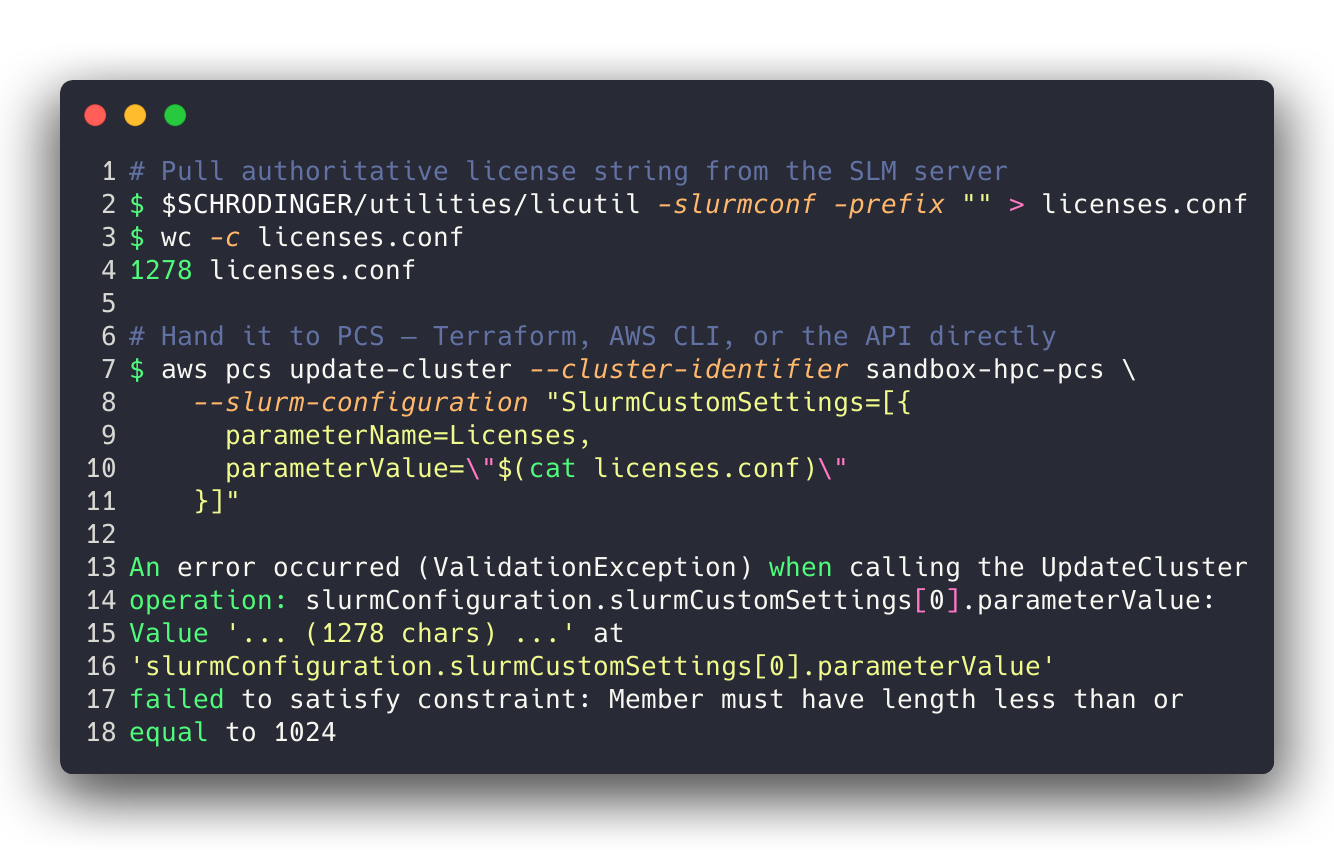
AWS Parallel Computing Service (PCS) previously capped every slurmCustomSettings.parameterValue at 1,024 characters. The limit applied uniformly through Terraform, the AWS CLI, and the PCS API. For license-heavy applications — notably a fully-populated Schrödinger Suite Licenses= string — the cap was an architectural wall: for one client the reference string from licutil -slurmconf came out at 1,278 characters, 254 over the limit. Neither Include (unsupported by PCS) nor sacctmgr (not honored by Schrödinger’s sbatch -L path) was a viable end-run.
For one client we worked around it by trimming unused license features after validating zero historical usage across both their sandbox and production ParallelCluster environments. AWS has since raised the cap to 2048 characters. If you were stuck on this limit, you can now likely configure your full license string — and thanks to PCS’s dynamic cluster-updates feature (GA October 2025), you can apply it in-place via aws pcs update-cluster without destroying and recreating the cluster. With one caveat about Terraform that bites if you don’t know.
The original break
A fully-populated Schrödinger SLM license string, pulled authoritatively from the license server with $SCHRODINGER/utilities/licutil -slurmconf, is not small. Every feature in a pharma drug-discovery license grant — 64 of them in our case — produces one comma-separated <feature>:<count> token, and the string as emitted is ~1.3 KB.
Push that into a PCS cluster via any of the standard paths — Terraform, aws pcs update-cluster, the API directly — and PCS returns a validation error. The cap is hard, synchronously enforced at the control plane, and it applies to every slurmCustomSettings parameter, not just Licenses. But Licenses is overwhelmingly the one where scientific-computing shops hit it, because the other settings that take long values (Prolog, Epilog, JobSubmitPlugins, etc.) are paths, not enumerations of features and counts.
None of the obvious escape hatches work:
Includeinslurm.conf— unsupported in PCSslurmCustomSettings. You cannot sayInclude=/shared/licenses.confand hide the length behind a file reference.sacctmgr add resource— stores licenses in theslurmdbdaccounting database rather thanslurmctld’s localLicenses=tracking. That works for Slurm-native clients submitting with--licenses=foo@slurmdb:N, but Schrödinger’s JobServer and thejobcontrollayer both submit with plainsbatch -L <feature>:<count>, which the localslurmctldresolves againstslurm.conf’sLicenses=list. IfLicenses=doesn’t contain the feature, the job fails with an “Invalid license” error at submission.sacctmgr-defined licenses are invisible to that path.- Split across clusters — functional, but doubles your controller spend and breaks cross-workload scheduling.
So the only thing left was to make the string shorter.
The workaround: trim what’s unused, validate with sacct
If you look at a typical Schrödinger license grant, you’ll find a handful of feature families that many drug-discovery sites have licensed historically but never actually use: materialscience_* (polymers, crystallography, reactivity), ffld_* (force-field development tools), combiglide_* (combinatorial chemistry library enumeration). These are legitimate products but they don’t come up in standard structure-based drug design.
Before cutting anything we validated the assumption with Slurm accounting on existing ParallelCluster environments — one sandbox, one production. sacct has a --format=Licenses field that records which license features each job consumed. A trivial loop gives you a per-feature usage count across any date range. We ran it from 2024-01-01 through the day of the analysis and got the answer we expected:
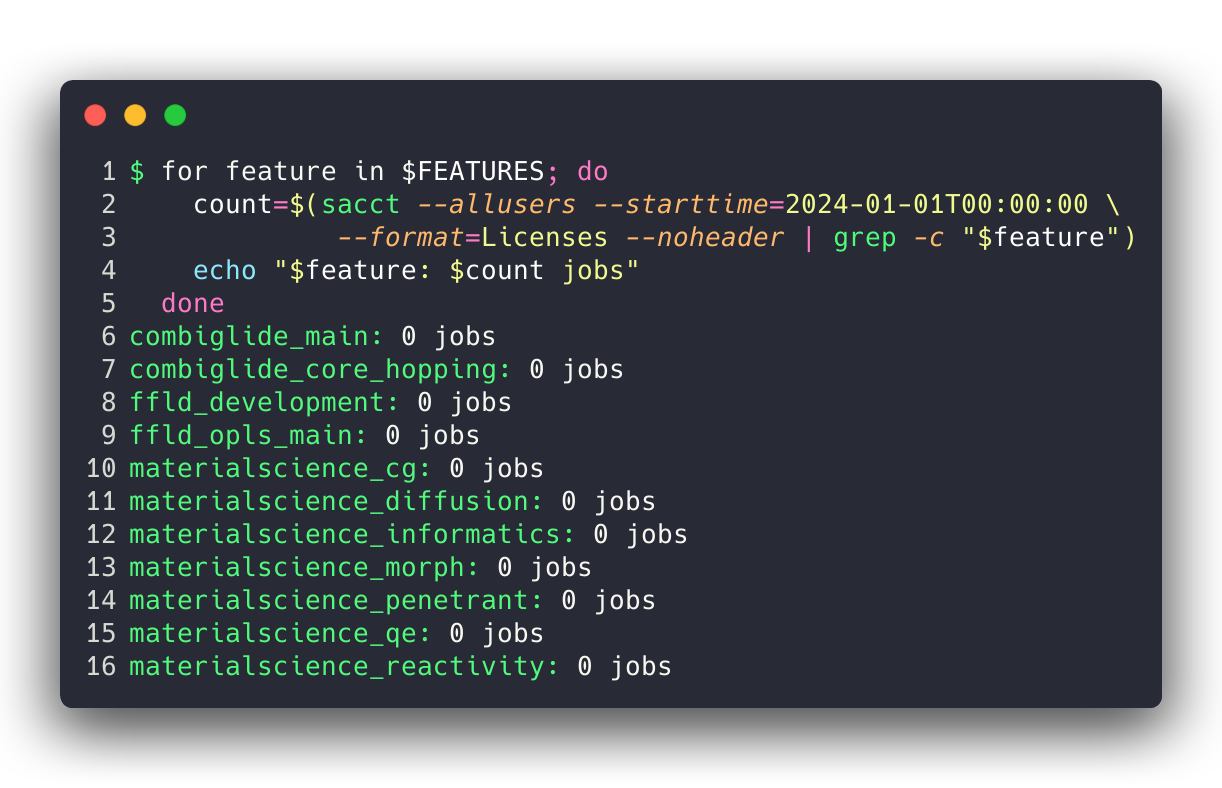
Every feature in the removal list had zero historical jobs on both clusters. We trimmed 10 features from the license string — 261 characters — leaving 54 features at 1,017 characters, 7 characters under the cap. That fits.
One gotcha worth naming explicitly: the AutoDesign feature is called autodesigner in the license string, not autodesign. Easy to miss on a grep, easy to drop accidentally. It passes straight through licutil -slurmconf as autodesigner:1 and should stay.
The fix
AWS has since lifted the 1,024-character cap on slurmCustomSettings.parameterValue. The PCS API reference for SlurmCustomSetting now documents parameterValue as Type: String with no length constraint. If you have a cluster that was trimmed down to fit the old limit, you can now reinstate the full licutil -slurmconf string without editing or choosing what to drop.
The interesting operational question is how to apply it. Two paths, wildly different behavior:
AWS CLI: in-place update
Since AWS PCS shipped dynamic cluster updates in October 2025, Slurm custom settings including Licenses can be modified on a live cluster without recreating it. The update path is:

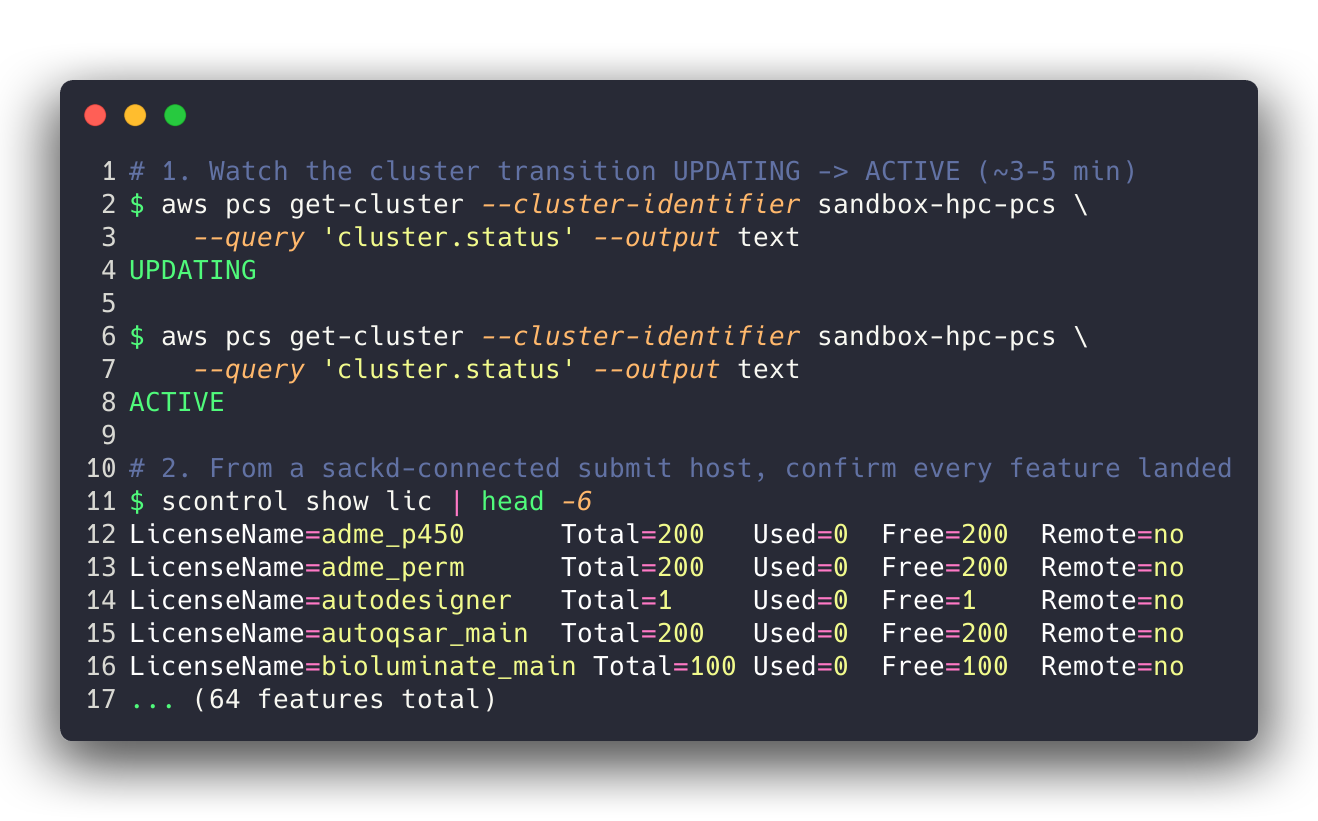
The cluster transitions to UPDATING, stays there for a few minutes, and returns to ACTIVE with the new Licenses= value applied. Compute nodes keep running existing jobs; new submissions pause briefly during the UPDATING window and resume once the controller picks up the change. No drain, no node-group rebuild, no disruption to long-running workloads.
Terraform: full cluster replacement
If you manage PCS via Terraform (we use the AWS awscc provider for this at multiple clients), any change to the slurm_configuration block is treated as immutable. terraform plan will show a # forces replacement marker next to the change, and applying it will destroy and recreate the entire cluster. Every queue, every compute node group, every sackd-connected submit host re-registration — gone and rebuilt.
This is a provider-level limitation, not a PCS-level one. The CloudControl-ish awscc resource definition for awscc_pcs_cluster treats the Slurm configuration as a create-time-only set of fields. AWS may address this in a future provider release, but as of today, use the AWS CLI for in-place Licenses= updates and let Terraform drift on that specific field until the provider catches up. The cluster-as-a-whole remains Terraform-managed; only the slurm_configuration.slurm_custom_settings.Licenses entry floats outside.
Concretely, a safe live-cluster update looks like:
- Pull the authoritative string from
licutil -slurmconf. aws pcs update-cluster --slurm-configuration '...'with the full string.- Wait for the cluster to return to
ACTIVE. sackd/ head-node login andscontrol show licto confirm every feature appeared.- Run a quick Schrödinger
testapp -HOST <queue> -l <feature>:1for any feature you suspect won’t resolve — the scheduler’s “Invalid license” error surfaces immediately if you typoed a name.
If you’re rebuilding a cluster from scratch via Terraform today, go ahead and put the full string in slurm_custom_settings.Licenses — the 1,024-char ceiling no longer blocks a fresh apply.
Why it matters
Earlier versions of PCS did not support license-aware job scheduling at all, a major blocker for many BioTeam work projects. Later releases then supported the new Licenses= parameter, but our work with chemistry-heavy workloads meant that we hit the 1024 character limit, and it (again) blocked use of PCS for Schrodinger workloads in particular.
This is why we are still a “mostly ParallelCluster” shop in 2026. Better control over customized Slurm settings.
Now we are unblocked in using PCS for computational chemistry HPC environments running on AWS.
Wrapping Up
The 1,024-character cap on slurmCustomSettings.parameterValue in AWS PCS is gone. If you were stuck trimming your license string to fit, you can now push the full licutil -slurmconf output directly. Apply the update in-place with aws pcs update-cluster — the dynamic-cluster-updates feature (GA October 2025) makes this a ~5 minute operation with no disruption to running jobs. Avoid applying the change via Terraform: as of today the awscc provider treats slurm_configuration as immutable and will destroy and recreate the cluster. Let Terraform drift on that one field, or reconcile at your next planned rebuild.