
This Post is 100% Google Search Bait
This is one of those short-form posts I throw up, hoping that someone in the future using Google does not waste the time that I did debugging this issue.
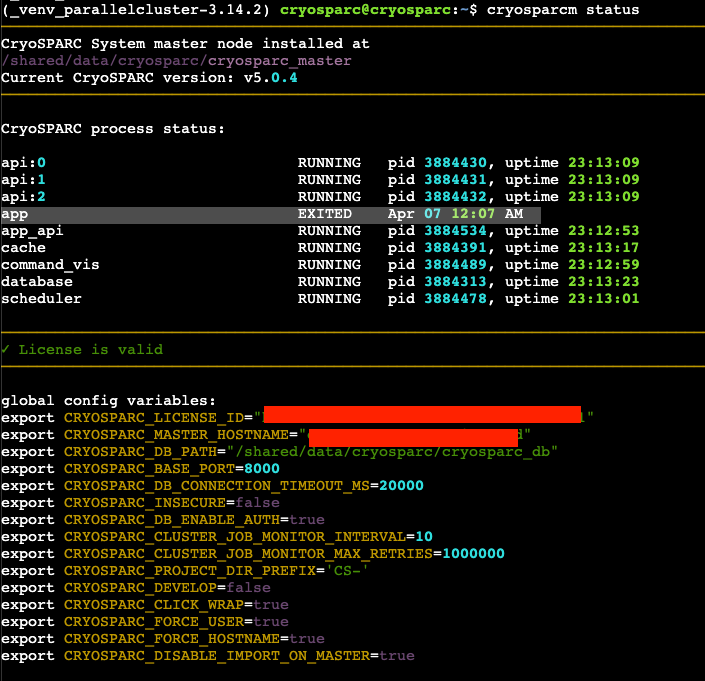
If you are dealing with an issue where the CryoSPARC v5 application from the fine folks at https://cryosparc.com is crashing daily (just the ‘app’, not the API endpoints), then look at your web vulnerability stack and check the server logs for HTTP requests, specifically for errors indicating a security probe or a cascading series of requests for content that simply does not exist.
Nessus was our root cause — a daily scan at midnight reliably crashed the Node process behind the CryoSPARC app
I didn’t catch this in time because I had recently done major work on this application to upgrade from v4 to v5 while also relocating it to a different AWS account and moving the MongoDB database to a storage layer, where all the paths had changed. So when CryoSPARC started crashing every night, I focused first on mistakes I may have made that affected stability and uptime.
But the root cause was pretty obvious once I stopped blaming my own actions. The logs were full of hostile and probing HTTP requests from an internal IP that we mapped back to a Nessus Vulnerability Scanning instance. The flood of requests was enough to crash the Node instance servicing the CryoSPARC app.
CryoSPARC app and database are not configured to restart automatically on failure
We also found that the default CryoSPARC install configures supervisord.conf so that only some CryoSPARC services restart automatically.
Looking at the config file in the CryoSPARC v5 install, we found that (api, app_api, scheduler, command_vis) all have autorestart=true. The app and database processes are the only ones with autorestart=false. Presumably, that is a config made for a reason so we don’t want to alter it unnecessarily, especially as a change would likely be reverted in a future upgrade.
However, in the short term, we are configuring the app to restart automatically while we engage with the team that owns the Tenable/Nessus scanning infra.
Hope this helps someone else in the future!