
Contents
[—ATOC—] [—TAG:h2—]
Background & Disclaimer
This blog page attempts to clean up and organize the scattered notes I maintain on how to build Grid Engine on various platforms. This post in particular is talking about Open Grid Scheduler version 2011.11 as built on CentOS 6.2 (a binary clone of RedHat Enterprise Linux RHEL 6.2).
First round of notes will cover building on x86-64 but I’ll also try to document the same process for building 32bit executables as well.
Another reason for this document is that many of the online instructions for building Grid Engine take the “easy” way out by skipping the compilation of various features, services and subsystems. In particular I don’t like refusing to compile with Java just because it’s easier and I actually like having the java-based GUI installer present on my systems.
Skipped Build Items
The primary goal is to build as much of Grid Engine as possible. At this stage, the only things we are skipping are:
• ARCo
• sgeinspect binary
• Hadoop/Herd integration
Every other feature, service and 3rd party executable should be covered.
Differences between 6.2 and prior versions of CentOS and RHEL
The primary difference is that our 6.2 OS includes an updated version of OpenSSL that breaks Grid Engine compilation. This document covers the patch necessary to complete the build on RHEL 6.2 and CentOS 6.2.
Build Environment
Unless stated otherwise, assume that the build environment is a bare-bones CentOS 6.2 machine where I’ll be building SGE as user “root” and installing many of the external dependencies into /opt/
Required Linux OS Packages
I started with a stripped down bare-bones CentOS 6.2 VM and had to install the following distro packages. I can’t claim 100% that these are all the RPMs you will need but it’s probably fairly comprehensive:
$ sudo yum -y install "openmotif openmotif-devel openmotif22 openssl-devel openssl-static make gcc
autoconf pam-devel libXpm  libXpm-devel ncurses ncurses-devel unzip texinfo"
Download Open Grid Scheduler 2011.11
From the website: The 2011.11 release includes new features (e.g. Berkeley DB spooling improvement: removed dependency on NFSv4, hwloc support, GPU integration, ARM Linux port, gmake upgrade, Linux 3.0 support, etc), together with other enhancements and bug fixes.
See the release notes for more info!
# mkdir /opt/opengridscheduler-src
# cd /opt/opengridscheduler-src
# wget http://sourceforge.net/projects/gridscheduler/files/GE2011.11/GE2011.11.tar.gz/download?use_mirror=superb-sea2
# zcat GE2011.11.tar.gz | tar xvf -
Download & Install External Dependencies
There are a ton of them. Have patience.
Java, $JAVA_HOME and $PATH alterations
Visit http://www.oracle.com/technetwork/java/javase/downloads/index.html and grab a Java JDK. I used JDK 7u2 for x86-64 and selected the .tar.gz version for download.
# cd /opt/
# gunzip jdk-7u2-linux-x64.tar.gz
# tar xvf jdk-7u2-linux-x64.tar
# ln -s jdk1.7.0_02/ java
By making a symbolic link between /opt/jdk1.7.0_02 and /opt/java we can more easily set $JAVA_HOME to something convenient like “$JAVA_HOME=/opt/java”.
We need to set some environment variables and PATH settings next. I chose to do this by making an /etc/profile.d/sge-build.sh entry with the following contents. How you set your path and environment variables depends on your personal preference and what shell you use. Note that the sge-build.sh file also includes info about Java ANT and JUNIT .jar files that will be installed later on.
## Java
export JAVA_HOME=/opt/java
export ANT_HOME=/opt/ant
export CLASSPATH=/opt/junit/junit3.8.1/junit.jar:/opt/ant/lib/ant.jar
export JUNIT_JAR=/opt/junit/junit3.8.1/junit.jar
 ## Path Tweaking
export PATH=$PATH:$JAVA_HOME/bin:$ANT_HOME/bin
ANT
Visit http://ant.apache.org/index.html and grab Apache Ant. The version used in this document is 1.8.2.
# cd /opt/
# gunzip apache-ant-1.8.2-bin.tar.gz
# tar xvf apache-ant-1.8.2-bin.tar
# ln -s apache-ant-1.8.2 ant
JUNIT
This is another dependency of the various Java bits within Grid Engine, in this case I’m using junit-3.8.1:
# cd /opt/
# mkdir junit
# cd /opt/junit/
# wget http://downloads.sourceforge.net/project/junit/junit/3.8.1/junit3.8.1.zip?use_mirror=superb-sea2
# unzip junit3.8.1.zip
We will need to reference the location of junit.jar in CLASSPATH and a few other locations, those are documented elsewhere on this page.
JavaCC
This is another dependency of the various Java bits within Grid Engine, this time from http://javacc.java.net/:
# cd /opt/
# mkdir other-sge-deps
# mkdir other-sge-deps/java
# cd /opt/other-sge-deps/java/
# wget http://java.net/projects/javacc/downloads/download/javacc-5.0.tar.gz
# gunzip javacc-5.0.tar.gz
# tar xvf javacc-5.0.tar
The configuration parameters that point to javacc are documented elsewhere on this page, the primary setting is within the build.properties file in the source directory.
IzPack 1.4.4
We need IZpack which is apparently a nice cross-platform Java tool for bundling application installers. I think, but am not 100% sure, that this dependency is required to build the graphical SGE GUI installer.
There is one small problem though. My working build environment seems to explicitly use an ancient version of IzPack that is not even available for download any more on the http://izpack.org/downloads/ website. Given that my build environment works with version 1.4.4 and I seem to also have much more modern versions laying around in “_disabled/” folders I’m guessing that SGE has a dependency on this specific (and old) version.
For convenience I’ve uploaded version 1.4.4 here for others to use if needed: https://bioteam.net/wp-content/uploads/misc/Izpack-1.4.4.tar.gz
# cd /opt/
# wget  https://bioteam.net/wp-content/uploads/misc/Izpack-1.4.4.tar.gz
# gunzip Izpack-1.4.4.tar.gz
# tar xvf Izpack-1.4.4.tar
The specific places where we mention the Izpack location in the SGE build & config files is highlighted elsewhere on this page.
BerkeleyDB version 4.4.20
It’s actually important to use this (old) version of BerkeleyDB. It’s the last version that supports RPC spooling to a remote BDB database and the SGE build process assumes that this functionality is present. In addition, there have been some indications on the mailing list that internal use of BDB for berkeley-db based spooling also assumes behavior and technical features associated with the older versions of the code.
Visit http://www.oracle.com/technetwork/database/berkeleydb/downloads/index.html and follow the link to “Previous Releases” where you can find the 4.4.20 version.
You will see below that we are building with “–enable-rpc” and installing into /opt/berkeley-db/ which is where the BDB bin/ and lib/ directories will end up.
# mkdir /opt/berkeley-db
# mv db-4.4.20.tar.gz berkeley-db/
# cd berkeley-db/
# gunzip -c db-4.4.20.tar.gz | tar xvf -
# cd db-4.4.20
# cd build_unix
# ../dist/configure --prefix=/opt/berkeley-db/ --enable-rpc
# make
# make install
Patch Grid Engine 2011.11 Source to support OpenSSL-1.0.0
If you see this error, you are hitting an issue with openssl-1.0 on your system:
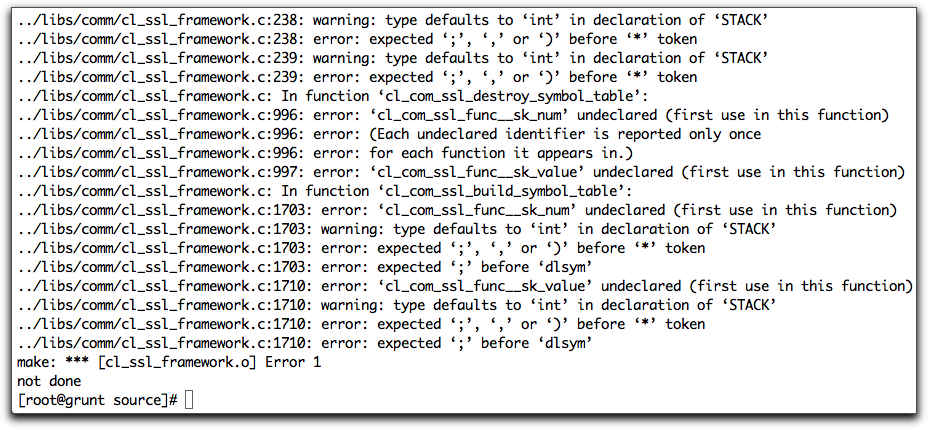
You can see the bug report and patch at this URL: http://bugs.debian.org/cgi-bin/bugreport.cgi?bug=622849 and you can download the actual patch via this URL: http://bugs.debian.org/cgi-bin/bugreport.cgi?msg=10;filename=622849-openssl.patch;att=1;bug=622849
Place the patch file one level above the GE2011.11 source/ folder:
[root@grunt GE2011.11]# ls -l
total 1140
-rw-r--r--.  1 root root    6763 Jan 12 14:38 622849-openssl.patch
-rw-rw-r--.  1 dag  dag     5403 Nov 14 14:01 Changelog
-rw-rw-r--.  1 dag  dag  1121679 Nov 14 14:01 Changelog.SGE
drwxrwxr-x.  7 dag  dag     4096 Nov 14 14:02 doc
drwxrwxr-x.  2 dag  dag    20480 Nov 14 14:02 review
drwxrwxr-x. 12 dag  dag     4096 Jan 12 14:30 source
Now patch the actual ./source/libs/comm/cl_ssl_framework.c file …
[root@grunt GE2011.11]#  patch -p1 < 622849-openssl.patch
patching file source/libs/comm/cl_ssl_framework.c
[root@grunt GE2011.11]#
Customize the aimk.site file
The local file aimk.site file contains site-specific information about where your external dependencies are installed.
My current aimk.site has the following customizations (note that the info below is not the entire file, just the lines that I have added or changed..
Berkely-DB settings in aimk.site:
# BERKELEYDB_HOME the directory where the include and lib directory of
# Berkeley DB is installed
#
set BERKELEYDB_HOME = /opt/berkeley-db/
set BDB_INCLUDE_SUBDIR =
set BDB_LIB_SUBDIR =
set BDB_LIB_SUFFIX =
OpenSSL settings in aimk.site:
## dag (set values for openssl libs and include files)
set OPENSSL_SOVERSION = 1.0.0-10
set OPENSSL_HOME = /usr
set OPENSSL_LIB_DIR = /usr/lib64
set OPENSSL_EXTRA_LIBS = "-lkrb5 -lz "
JUNIT settings in aimk.site:
set JUNIT_JAR = '/opt/junit/junit3.8.1/junit.jar'
Customize the build.properties file
This file is where we set parameters related to the building of the java componants
JUNIT edits:
# junit jar file classpath
libs.junit.classpath=/opt/junit/junit3.8.1/junit.jar
JavaCC edits:
javacc.home=/opt/other-sge-deps/java/javacc-5.0
Customize the ./clients/gui-installer/nbproject/project.properties file
Yeah there is probably a better or cleaner way to do this but I found I had to edit the clients/gui-installer/nbproject/project.properties file in order to fix some issues with finding a certain iZpack/ant.jar file and the Java SWING layout stuff. Here are my changes
SWING edits in project.properties:
#Swing layout
#libs.swing-layout.classpath=${izpack.home}/../swing-layout-1.0.3.jar
libs.swing-layout.classpath=${izpack.home}/swing-layout-1.0.3.jar
ANT edits in project.properties:
#Ant
#libs.ant.classpath=${izpack.home}/../ant.jar
libs.ant.classpath=/opt/Izpack-1.4.4/ant.jar
Hack up the aimk build file
Note: We are really not supposed to be doing this but it’s rare that I’m able to get through an SGE build without making minor alterations to the actual “aimk” compile script. This is where we can also get into personal preferences about how to build software so your own experience may be different,
Here are my edits…
I’m pretty sure this edit is meant to get around the fact that our libcrypto OpenSSL files are in “/usr/lib64” instead of “/usr/lib” and the KFLAGS additions are meant to proactively avoid a new and different compile error that I forgot to document in my notes …
Near line #370 in ./aimk:
#set SECLIBS_STATIC    = "$OPENSSL_HOME/lib/libssl.a $OPENSSL_HOME/lib/libcrypto.a"
#set KLFLAGS           = "-L$OPENSSL_HOME/lib"
set SECLIBS_STATIC    = "$OPENSSL_HOME/lib64/libssl.a $OPENSSL_HOME/lib64/libcrypto.a"
set KLFLAGS           = "-L$OPENSSL_HOME/lib64 -lkrb5 -lz"
This next edit I believe is required to let the ‘qtcsh’ binary build properly, it complains unless we add “-ltermcap” …
Near line #3043 in ./aimk:
# Dag hack for qtcsh on CentOS 6.2 ...
# set SGE_LIBS = "-lsge -lpthread"
set SGE_LIBS = "-lsge -lpthread -ltermcap"
Build Grid Engine from Source
Whew! Now that all the pre-requisites, patching and hacking is done Grid Engine should ideally build smoothly from scratch at this point.
Refer to the README.build and README.aimk text files if needed. The commands that follow are taken straight from the build docs.
Prepwork
# ./aimk -only-depend
# scripts/zerodepend
# ./aimk depend
Build binaries & manpages
# ./aimk
# ./aimk -man
Hack up the scripts/distinst binary staging script
The “distinst” script is used to stage the newly built binaries into a location where the “mk_dist” script can finally start building .tar.gz archives for distribution. We need to make a few edits to it first …
Edit Line #718 of scripts/distinst & set insthadoop=false to prevent failure due to missing “herd.jar”:
insthadoop=false
Edit near line #1551 to fix location of the libcrypto.so.1.0.0 file (it’s looking in lib/ instead of lib64/ )
Note the two separate edits where we make changes from “lib” to “lib64/” below …
  elif [ -f $OPENSSLBASE/lib64/$libname ]; then
    #libname=$OPENSSLBASE/lib/$libname
    libname=$OPENSSLBASE/lib64/$libname
  fi
Edit the scripts/distinst.site configuration file
We need to configure some values here to fix some OpenSSL and Berkeley-DB values.
# Base directory where the openssl binary and libraries reside
OPENSSLSOVERSION=1.0.0
OPENSSLBASE=/usr/
# Base directory where BDB resides
BERKELEYDBBASE=/opt/berkeley-db/
Stage the distribution binaries by running the scripts/distinst script
I decided my staging location was going to be “/opt/opengridscheduler-src/distinst-base/” so first we do:
# mkdir /opt/opengridscheduler-src/distinst-base/
And now we can actually run the distribution staging script!
# ./scripts/distinst -v -allall -bin -libs -basedir /opt/opengridscheduler-src/distinst-base/ -vdir GE2011.11
Build Grid Engine binary distribution archives
Now we can actually build distributable Grid Engine archives. The documentation recommends a symbolic link be placed inside your distinst “basedir” that points back to the “mk_dist” script:
# ln -s /opt/opengridscheduler-src/GE2011.11/source/scripts/mk_dist /opt/opengridscheduler-src/distinst-base/mk_dist
# cd /opt/opengridscheduler-src/distinst-base
And now we can actually run the command:
# ./mk_dist -vdir GE2011.11 -version GE2011.11 -common -doc -bin linux-x64
Check /tmp/sge6_dist/ for the new archives
Never had time to track down, change or care about this but by default it seems that “mk_dist” is placing our new binaries into /tmp/sge6_dist/ …
If things actually worked you should see something like this:
[root@grunt distinst-base]# ls -l /tmp/sge6_dist/
total 30384
-rw-r--r--. 1 root root 28162103 Jan 12 17:31 ge-GE2011.11-bin-linux-x64.tar.gz
-rw-r--r--. 1 root root  2946660 Jan 12 17:31 ge-GE2011.11-common.tar.gz
[root@grunt distinst-base]#
[root@grunt distinst-base]#
… and these are the standard “courtesy binary” archives that many of us are long familiar with.